Use the template editor to build a layout that can adapt to different posts. Open an editable template from Create → Templates, or create a blank one with New template.
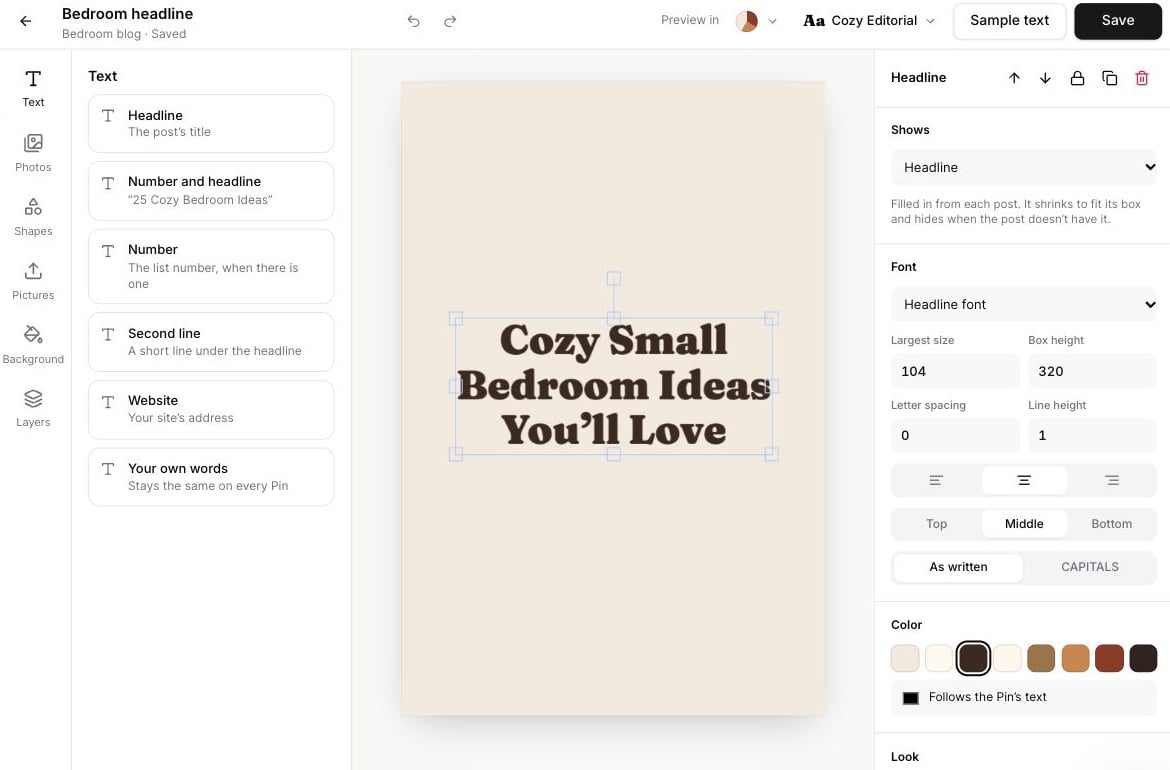
Template editor with a headline on the canvas and Shows, font and color settings

Dynamic text follows the post and adapts to its available space.

Add the right kind of content

Move and resize elements on the canvas. Use the selected-element panel for precise settings, duplication, layering, locking and deletion. Undo, Redo and zoom controls help refine the layout.

Dynamic text and fixed wording

The text panel’s Shows setting can use Headline, Number and headline, Number, Second line or Website. These fields fill from each post, shrink to fit their box and hide when the post has no matching text. Choose Your own words for a phrase that stays the same. Double-click fixed text to edit it. Check the largest font size, box height, alignment, line height and letter spacing so long headlines remain readable.

Photo frames and fixed pictures

Post photo 1 and subsequent slots pull photos from the source post. Choose a frame shape and place it on the design. A template with several distinct photo slots needs that many suitable photos before Pin Maker can use it. Use Pictures for a fixed logo rather than a post-photo slot. Keep uploads small enough to save; the editor reports when a template is too large.

Theme styles

Theme colors follow the palette chosen in Pin Maker. A custom color stays fixed. Text can similarly follow Headline font, Body font or Script font, or use a fixed font. Use theme styles for adaptable templates; use fixed choices for brand elements that should never change.

Preview and save

Use Sample text to try long and short headlines and missing optional fields. Sample text is a preview and is not saved as the template’s content. Preview multiple palettes and font sets to check contrast and wrapping. Give the template a useful name and click Save. Check Saved before leaving; the template editor requires an explicit save. Then use it on a real post in Pin Maker to confirm the layout works with its photos and wording.