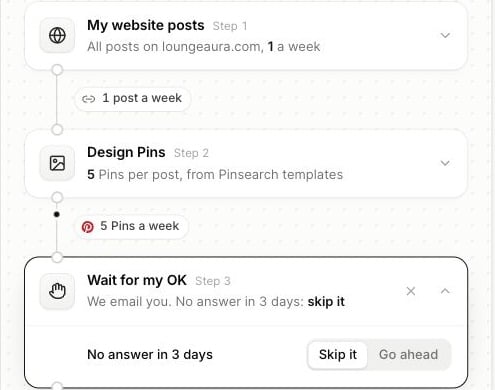
Add Wait for my OK when you want to review articles or Pins before the next step acts on them. Its position determines what you are approving. For example, put it after Write articles to review an article before WordPress publication. Put another after Design Pins to review designs before scheduling.
Automation flow with an open Wait for my OK step and Skip it or Go ahead timeout choices

Each approval step has its own choice for an unanswered review request.

Respond to a review

On real runs, Pinsearch emails you when an item needs approval. Open the automation’s page and review the waiting item.
  • Open the article to read and edit it before approving.
  • Review the generated Pin previews before allowing the scheduling step to continue.
  • Choose Approve to continue that item through the remaining flow.
  • Choose Skip to stop that item from progressing.
An approval applies to that item and step. A flow with two approval steps can ask again later for a different result.

No answer in three days

Choose the timeout behavior in each Wait for my OK step:
Go ahead can allow WordPress publication or Pinterest scheduling after the timeout. Choose Skip it when every item needs your explicit approval.
Skipping does not undo an earlier action. Place approval steps before publication or scheduling if those actions need your review.

Approval during a test

The test panel also offers Approve and Skip when the test reaches a review step. This demonstrates the pause, while the test continues to keep final publication disabled. See testing and building flows.