

Choose a publishing method
1
Prepare the account's queue times
Open Publishing → Settings. Set the time zone and weekly queue times, then save. Check the spacing between Pins from the same URL.
2
Add ready drafts
In Drafts, choose a board and use Add to queue. For a batch, click Select, choose ready drafts and add them together.
3
Review upcoming Pins
Open Queue. Use List for order and empty slots, or Calendar for a Week or Month view.
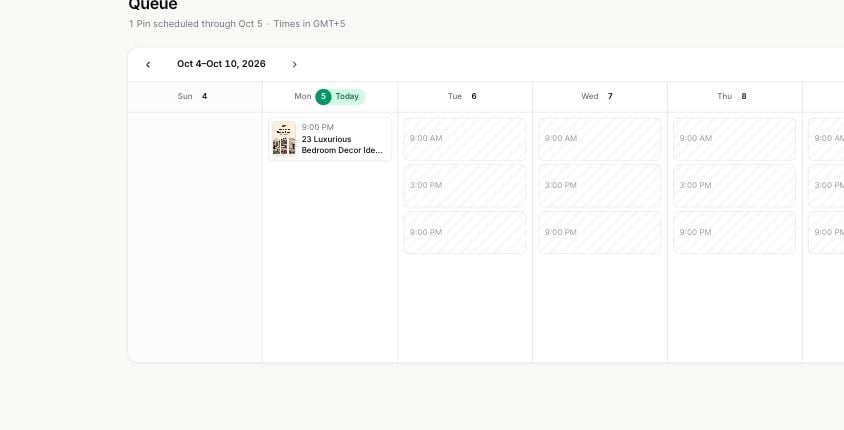
The week calendar shows queued Pins and empty posting times.
Set a specific time
From a draft’s menu, choose Schedule Pin. Select the date and time in the account’s displayed time zone. Resolve any validation message before confirming. A specific time must still respect publishing limits and spacing rules. Daylight-saving changes can make a local time unavailable or ambiguous; use a different valid time when prompted.Adjust the queue
- Drag Pins to change queue order, or use Move to top.
- Drop a Pin onto an empty slot to give it that time.
- Click an empty slot to create a new Pin for that slot.
- Open Edit to change Pin details without changing its place in the queue.
- Use Move to Drafts to remove a Pin from upcoming publication while keeping it for later.
- Use Publish now if the Pin should go out immediately.
Spacing and waiting for a time
Pins from the same destination URL are spread out according to your spacing settings. Multiple designs for one post may therefore fill times farther apart than Pins for different posts. Waiting for a time means the Pin is queued but has no available time assigned yet. Check queue times, daily capacity and same-URL spacing. The queue plans within a three-month window.Queue times are approximate: Pins can go out within a few minutes of the shown time. The calendar is a schedule, not a guarantee of publication before you check the result.