

Save a profile from Profile Explorer
1
Open a profile report
Search for a profile in Profile Explorer.
2
Click Add to Project
Click Add to Project in the profile header.
3
Choose a Project
Select the Project where you want to save the profile.

The Add to Project button appears in the profile header.
Choose or create a Project
When the Project picker opens, you can save to an existing Project or create a new one.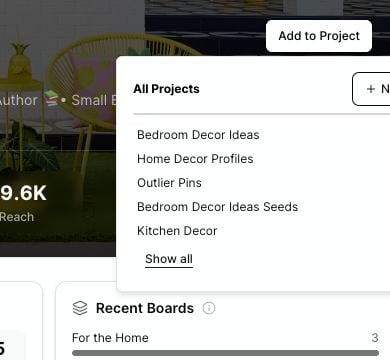
Choose an existing Project or click New to create a Project while saving the profile.
- Click New.
- Enter a Project name.
- Confirm the new Project.
- Add the profile to that Project.
Duplicate profiles
If the profile is already saved in the Project, Pinsearch does not save it again. You may see a message letting you know the profile has already been added. Choose a different Project if you want the same profile in another research workspace.When to save a profile
Save a profile when you want to:- Track a competitor in your niche.
- Compare several Pinterest accounts for a campaign.
- Keep profile metrics together with saved keywords and pins.
- Revisit strong profiles while planning future content.
- Build a client research file inside Pinsearch.