

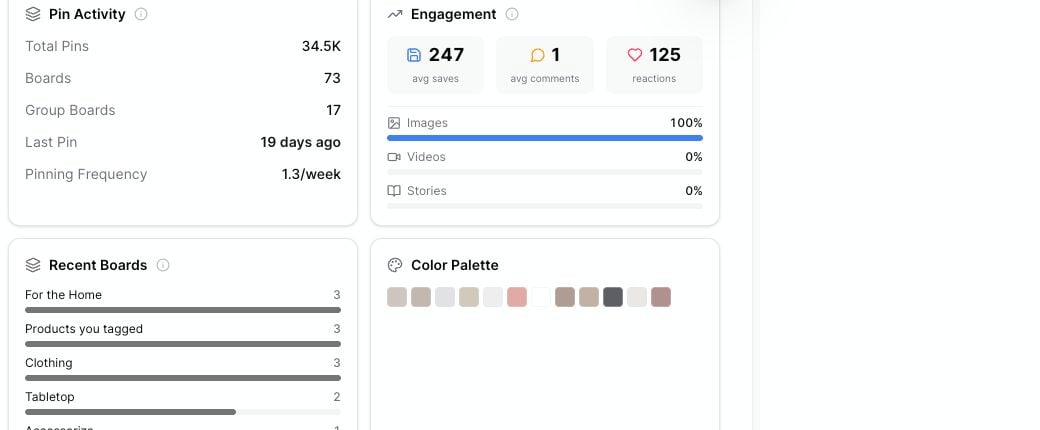
Recent boards, colors, and topic labels help you spot content patterns in a profile's recent pins.
Recent Boards
The Recent Boards card shows which boards appear most often in the recent pins Pinsearch analyzed. Use this card to understand where a profile is concentrating its content. For example:- A home decor profile may pin often to For the Home.
- A food profile may have separate boards for dinners, desserts, and seasonal ideas.
- A style profile may split content across outfits, accessories, and shopping boards.
Recent Topics
The Recent Topics card shows Pinterest topic labels connected to recent pins. Some labels may include a small count, such asx2 or x3, when that topic appears more than once.
Use topics to find language Pinterest understands around the content. These labels can help with:
- Pin title ideas.
- Board naming ideas.
- Article angles.
- Keyword research follow-ups.
- Content clusters for a niche.
Color Palette
The Color Palette card shows common colors from recent pin images. Click a color swatch to copy the color value. You can use copied colors in a design tool, content brief, brand moodboard, or creative note. Use the palette to notice visual patterns like:- Bright colors versus muted colors.
- Seasonal colors.
- Neutral backgrounds.
- Strong accent colors.
- Repeated product or lifestyle colors.
Turn signals into content ideas
Use all three cards together:- Start with Recent Boards to see the content areas the profile is using.
- Review Recent Topics to find Pinterest-friendly wording.
- Check Color Palette to understand the visual style.
- Open Top Performing Pins to see which examples got saves or comments.