

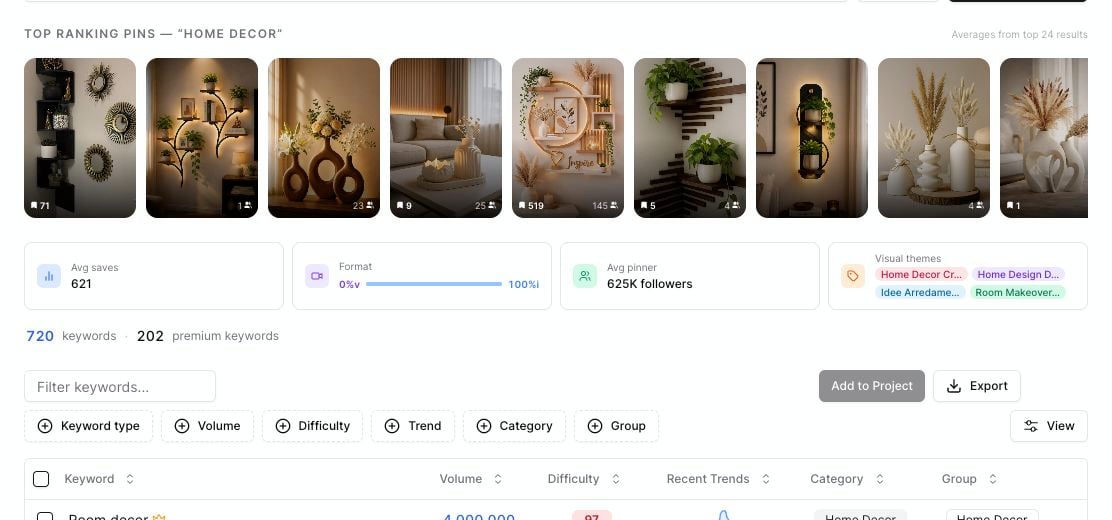
Keyword Intelligence shows top ranking pins, average saves, format mix, pinner follower signals, and visual themes.
What Keyword Intelligence shows
After a search, Pinsearch can show:- Top ranking pins: A visual strip of pins that are ranking for the keyword.
- Avg saves: The average saves across the analyzed pins.
- Format: The mix of image and video pins.
- Avg pinner: The average follower count of pinners in the analyzed results.
- Visual themes: Common visual labels found across the top pins.
How to use top ranking pins
Look at the top pin strip before choosing your content angle. Ask:- What type of image keeps appearing?
- Are the pins mostly product photos, list graphics, lifestyle images, or tutorials?
- Do the titles feel broad or specific?
- Are the top pins from large accounts or smaller creators?
How to use average saves
Avg saves gives you a quick feel for how much engagement the top pins have earned. High average saves can mean the topic is attractive to Pinterest users. Low average saves can still be useful if the topic is specific, new, or closely matched to your audience.How to use format mix
The Format card shows the split between video and image results. Use this signal when planning creative:- If most results are images, start with strong static pin designs.
- If videos appear often, consider testing video pins.
- If the mix is balanced, create both formats when you have time.
How to use visual themes
Visual themes show repeated patterns across the top ranking pins. Use them for practical creative direction:- Colors and moods to test
- Objects or scenes that appear often
- Content formats people already respond to
- Related visual angles for new pins
Turn signals into a content decision
A useful keyword usually has a mix of:- Good estimated volume
- Difficulty you can reasonably compete with
- Top pins that show clear demand
- Visual themes you can create well
- A topic that fits your brand or blog