

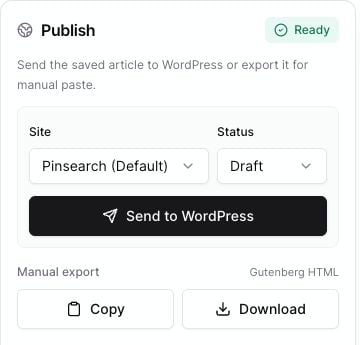
The readiness badge tells you whether the article is ready or still has warnings to review.
What warnings mean
Warnings do not always mean publishing is impossible. They mean Pinsearch found something worth fixing before you send the article. Some warnings block publishing, such as having no connected WordPress site. Others are quality reminders, such as missing alt text.Common warnings and fixes
No WordPress site connected
No WordPress site connected
Connect a WordPress site in Settings before using Send to WordPress.You can still use Copy or Download under Manual export if you want to publish manually.
Select a WordPress site
Select a WordPress site
Choose a site in the Site field.This can happen when you have connected sites but none is currently selected for this article.
Missing title
Missing title
Add a clear article title at the top of the editor.The title is used for the WordPress post title and for manual export.
Empty article body
Empty article body
Add or restore article content in the editor body.WordPress needs article content to create a useful post.
No featured image selected
No featured image selected
Open the Image tab, select an image, and click Feature.A featured image helps WordPress themes and previews show the post more clearly.
Some images are missing alt text
Some images are missing alt text
Open the Image tab, select each image, and fill in Alt text.Keep alt text short, descriptive, and specific to the image.
Some images need a public URL before WordPress upload
Some images need a public URL before WordPress upload
WordPress needs to fetch images from a public web URL before Pinsearch can attach them to a post.If this warning appears, save the article, check the affected image, and try publishing again. If it keeps happening, use manual export and upload that image directly inside WordPress.
SEO metadata warning after publishing
SEO metadata warning after publishing
Sometimes WordPress accepts the post but does not accept SEO metadata from Pinsearch.If the post was created, open it in WordPress and enter the SEO title or meta description in your SEO tool manually.
If warnings remain
After fixing a warning:- Click Save.
- Recheck the Publish panel.
- Send the article again when the warning count is gone or you understand what remains.