> ## Documentation Index
> Fetch the complete documentation index at: https://docs.pinsearch.co/llms.txt
> Use this file to discover all available pages before exploring further.
# Understand profile header metrics
> Interpret followers, monthly views, reach, traffic estimates, and profile status in Profile Explorer.
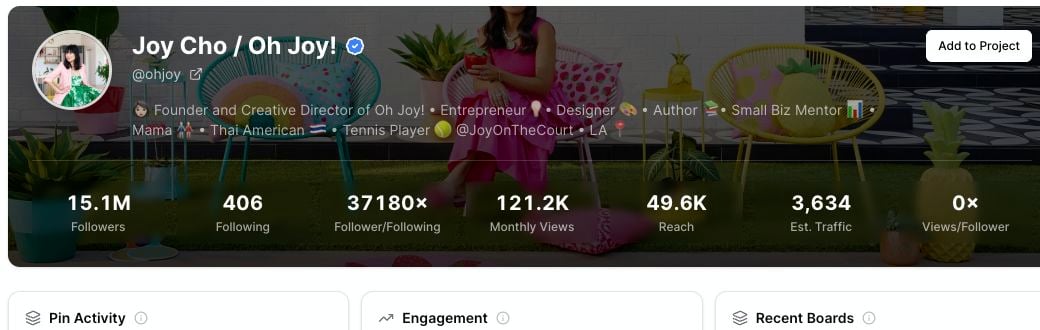
The Profile Explorer header gives you a quick read on a Pinterest account before you look at recent pins.
Use it to compare profiles, decide which competitors are worth saving, and understand whether an account is active and relevant to your niche.
 ## Account details
The left side of the header can show:
* **Profile name:** The account name shown on Pinterest.
* **Username:** The Pinterest handle.
* **Profile link:** An external-link icon that opens the profile on Pinterest.
* **Verified badge:** A badge when the profile has a verified identity.
* **Private status:** A lock icon when the profile appears private.
* **Description:** The profile bio or about text.
* **Domain:** A connected website, when the profile shows one.
## Metrics in the header
Use these metrics as quick comparison signals.
| Metric | What it means | How to use it |
| ---------------------- | ------------------------------------------------- | ----------------------------------------------------------------------- |
| **Followers** | The profile's audience size. | Compare profiles in the same niche. |
| **Following** | How many accounts the profile follows. | Spot whether an account follows many others or keeps a smaller list. |
| **Follower/Following** | Followers compared with following count. | Compare audience strength across profiles. |
| **Monthly Views** | Monthly profile view count shown for the account. | Understand profile visibility. |
| **Reach** | A directional reach signal shown by Pinsearch. | Compare profiles against each other, not as a private analytics number. |
| **Est. Traffic** | A directional traffic estimate. | Use it to prioritize competitors for deeper research. |
| **Views/Follower** | Monthly views compared with follower count. | Spot profiles that may get attention beyond follower size. |
These numbers are best used for comparison. They help you decide which profiles to study, but they should not be treated as exact private analytics from the profile owner.
## How to interpret the numbers
A large profile is not always the best profile to study.
Look for a mix of:
* A relevant niche.
* Active recent pins.
* Healthy saves or comments on recent pins.
* Topics that match your own content area.
* A strong views-per-follower signal.
For example, a smaller profile with focused boards and strong recent saves may be more useful than a huge profile in a broad niche.
## Domain and verification signals
Some profiles show a connected website under the username.
## Account details
The left side of the header can show:
* **Profile name:** The account name shown on Pinterest.
* **Username:** The Pinterest handle.
* **Profile link:** An external-link icon that opens the profile on Pinterest.
* **Verified badge:** A badge when the profile has a verified identity.
* **Private status:** A lock icon when the profile appears private.
* **Description:** The profile bio or about text.
* **Domain:** A connected website, when the profile shows one.
## Metrics in the header
Use these metrics as quick comparison signals.
| Metric | What it means | How to use it |
| ---------------------- | ------------------------------------------------- | ----------------------------------------------------------------------- |
| **Followers** | The profile's audience size. | Compare profiles in the same niche. |
| **Following** | How many accounts the profile follows. | Spot whether an account follows many others or keeps a smaller list. |
| **Follower/Following** | Followers compared with following count. | Compare audience strength across profiles. |
| **Monthly Views** | Monthly profile view count shown for the account. | Understand profile visibility. |
| **Reach** | A directional reach signal shown by Pinsearch. | Compare profiles against each other, not as a private analytics number. |
| **Est. Traffic** | A directional traffic estimate. | Use it to prioritize competitors for deeper research. |
| **Views/Follower** | Monthly views compared with follower count. | Spot profiles that may get attention beyond follower size. |
These numbers are best used for comparison. They help you decide which profiles to study, but they should not be treated as exact private analytics from the profile owner.
## How to interpret the numbers
A large profile is not always the best profile to study.
Look for a mix of:
* A relevant niche.
* Active recent pins.
* Healthy saves or comments on recent pins.
* Topics that match your own content area.
* A strong views-per-follower signal.
For example, a smaller profile with focused boards and strong recent saves may be more useful than a huge profile in a broad niche.
## Domain and verification signals
Some profiles show a connected website under the username.
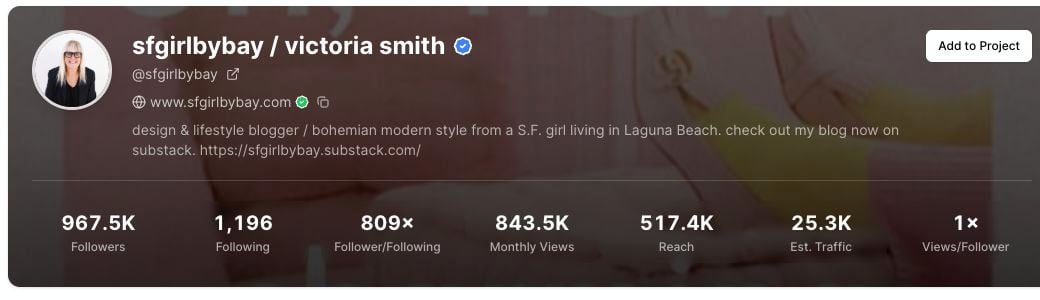 The domain line can help you connect a Pinterest account to a blog, shop, or brand website. A verification marker can also appear when the domain is verified on the Pinterest profile.
## Use header metrics with recent pins
After you review the header, scroll to the recent pin sections.
The header tells you profile size and visibility. Recent pins show what the account is actually publishing and which examples are getting engagement.
## Related guides
* [Analyze recent pin performance](/pinsearch-product-guides/profile-explorer/analyze-recent-pin-performance)
* [Copy and use profile domain information](/pinsearch-product-guides/profile-explorer/copy-and-use-profile-domain-information)
* [Save competitor profiles to Projects](/pinsearch-product-guides/profile-explorer/save-competitor-profiles-to-projects)
* [Profile Explorer](/pinsearch-product-guides/profile-explorer/profile-explorer)
The domain line can help you connect a Pinterest account to a blog, shop, or brand website. A verification marker can also appear when the domain is verified on the Pinterest profile.
## Use header metrics with recent pins
After you review the header, scroll to the recent pin sections.
The header tells you profile size and visibility. Recent pins show what the account is actually publishing and which examples are getting engagement.
## Related guides
* [Analyze recent pin performance](/pinsearch-product-guides/profile-explorer/analyze-recent-pin-performance)
* [Copy and use profile domain information](/pinsearch-product-guides/profile-explorer/copy-and-use-profile-domain-information)
* [Save competitor profiles to Projects](/pinsearch-product-guides/profile-explorer/save-competitor-profiles-to-projects)
* [Profile Explorer](/pinsearch-product-guides/profile-explorer/profile-explorer)