> ## Documentation Index
> Fetch the complete documentation index at: https://docs.pinsearch.co/llms.txt
> Use this file to discover all available pages before exploring further.
# Save competitor profiles to Projects
> Save Pinterest competitor profiles into a Pinsearch Project.
Save competitor profiles to Projects when you want to keep your Pinterest research organized.
This is useful when you are comparing brands, building a content plan, researching a client niche, or collecting examples to revisit later.
## Save a profile from Profile Explorer
Search for a profile in **Profile Explorer**.
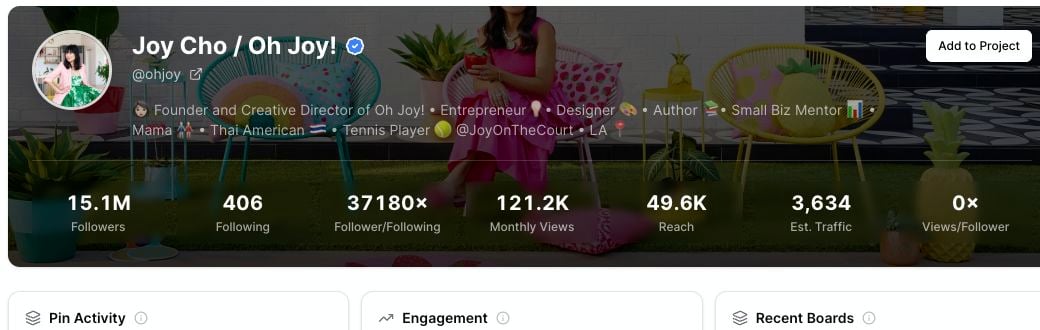
Click **Add to Project** in the profile header.
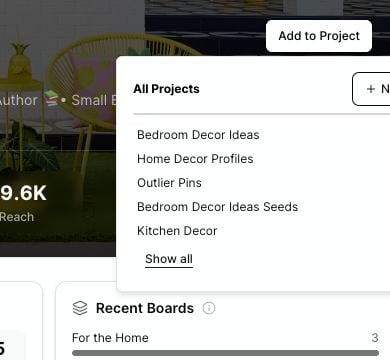
Select the Project where you want to save the profile.
 ## Choose or create a Project
When the Project picker opens, you can save to an existing Project or create a new one.
## Choose or create a Project
When the Project picker opens, you can save to an existing Project or create a new one.
 To create a new Project while saving:
1. Click **New**.
2. Enter a Project name.
3. Confirm the new Project.
4. Add the profile to that Project.
Project names must be at least 3 characters long.
## Duplicate profiles
If the profile is already saved in the Project, Pinsearch does not save it again.
You may see a message letting you know the profile has already been added. Choose a different Project if you want the same profile in another research workspace.
## When to save a profile
Save a profile when you want to:
* Track a competitor in your niche.
* Compare several Pinterest accounts for a campaign.
* Keep profile metrics together with saved keywords and pins.
* Revisit strong profiles while planning future content.
* Build a client research file inside Pinsearch.
## Review saved profiles later
Saved profiles live inside the Project you chose.
Open the Project later to review saved competitor profiles alongside saved keywords and pins from the same research session.
## Related guides
* [Create and manage Projects](/pinsearch-product-guides/projects/create-and-manage-projects)
* [Save research to Projects as you work](/pinsearch-product-guides/projects/save-research-to-projects-as-you-work)
* [Review, export, and clean up Project research](/pinsearch-product-guides/projects/review-export-and-clean-up-project-research)
* [Profile Explorer](/pinsearch-product-guides/profile-explorer/profile-explorer)
To create a new Project while saving:
1. Click **New**.
2. Enter a Project name.
3. Confirm the new Project.
4. Add the profile to that Project.
Project names must be at least 3 characters long.
## Duplicate profiles
If the profile is already saved in the Project, Pinsearch does not save it again.
You may see a message letting you know the profile has already been added. Choose a different Project if you want the same profile in another research workspace.
## When to save a profile
Save a profile when you want to:
* Track a competitor in your niche.
* Compare several Pinterest accounts for a campaign.
* Keep profile metrics together with saved keywords and pins.
* Revisit strong profiles while planning future content.
* Build a client research file inside Pinsearch.
## Review saved profiles later
Saved profiles live inside the Project you chose.
Open the Project later to review saved competitor profiles alongside saved keywords and pins from the same research session.
## Related guides
* [Create and manage Projects](/pinsearch-product-guides/projects/create-and-manage-projects)
* [Save research to Projects as you work](/pinsearch-product-guides/projects/save-research-to-projects-as-you-work)
* [Review, export, and clean up Project research](/pinsearch-product-guides/projects/review-export-and-clean-up-project-research)
* [Profile Explorer](/pinsearch-product-guides/profile-explorer/profile-explorer)