> ## Documentation Index
> Fetch the complete documentation index at: https://docs.pinsearch.co/llms.txt
> Use this file to discover all available pages before exploring further.
# Profile Explorer
> Search and analyze Pinterest profiles in Pinsearch.
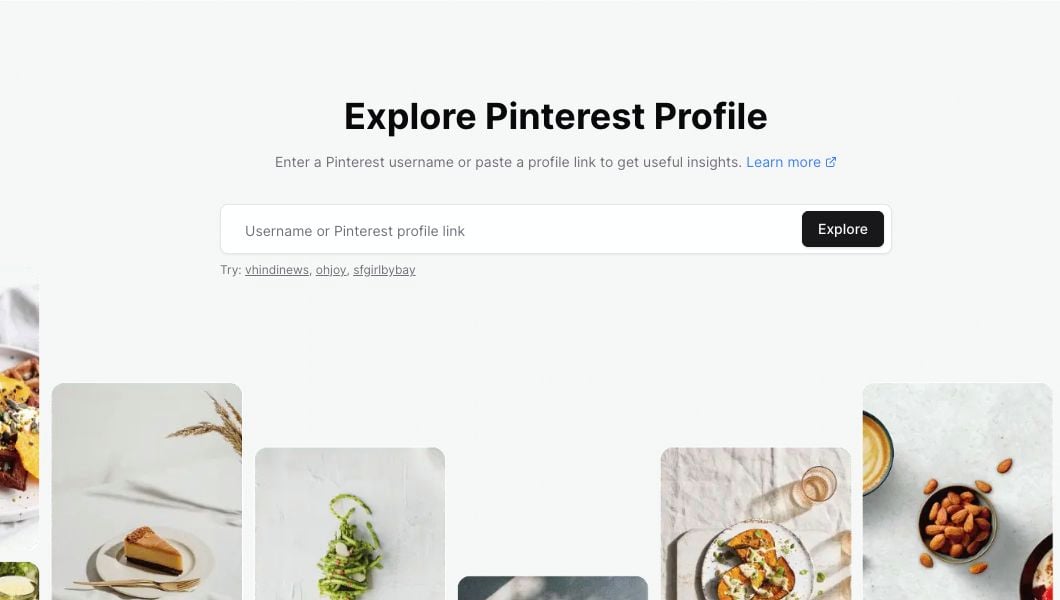
Profile Explorer helps you research Pinterest accounts before you plan content, choose competitors to watch, or save profiles into a Project.
Use it when you want to understand what a profile is about, how active it is, which pins are getting engagement, and which boards, topics, or colors show up often in recent content.
 ## When to use Profile Explorer
Use Profile Explorer when you want to answer questions like:
* How large is this Pinterest profile?
* How often does this profile publish pins?
* Which recent pins are getting saves, comments, or reactions?
* Which boards and topics appear most often?
* What visual colors does this profile use?
* Should I save this profile as a competitor in a Project?
## Search for a profile
You can search by entering:
* A Pinterest username, such as `ohjoy`
* A username with `@`, such as `@ohjoy`
* A full Pinterest profile link
Open **Profile Explorer** from the Research section.
Type a Pinterest username or paste a Pinterest profile URL.
Click **Explore**.
After the profile loads, Pinsearch opens a profile report.
## Read the profile header
The top section gives you a quick profile summary.
## When to use Profile Explorer
Use Profile Explorer when you want to answer questions like:
* How large is this Pinterest profile?
* How often does this profile publish pins?
* Which recent pins are getting saves, comments, or reactions?
* Which boards and topics appear most often?
* What visual colors does this profile use?
* Should I save this profile as a competitor in a Project?
## Search for a profile
You can search by entering:
* A Pinterest username, such as `ohjoy`
* A username with `@`, such as `@ohjoy`
* A full Pinterest profile link
Open **Profile Explorer** from the Research section.
Type a Pinterest username or paste a Pinterest profile URL.
Click **Explore**.
After the profile loads, Pinsearch opens a profile report.
## Read the profile header
The top section gives you a quick profile summary.
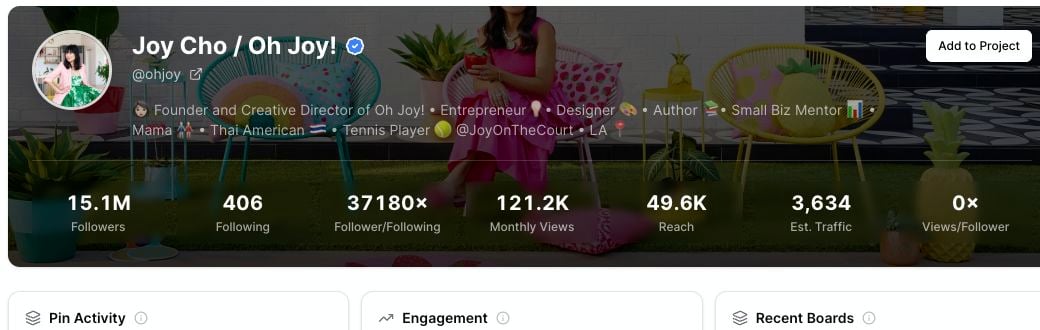 The header can include:
* **Followers:** The size of the profile audience.
* **Following:** How many accounts the profile follows.
* **Follower/Following:** A quick ratio for comparing audience size against following count.
* **Monthly Views:** The monthly view count shown for the profile.
* **Reach:** A directional reach estimate for comparing profiles.
* **Est. Traffic:** A directional traffic estimate for competitor research.
* **Views/Follower:** A quick way to compare attention against audience size.
* **Domain:** A website connected to the profile, when available.
Treat reach, estimated traffic, and views-per-follower as comparison signals. They are useful for research, but they are not the same as the account owner's private analytics.
## Review activity and engagement
Profile Explorer also summarizes recent pin activity.
The header can include:
* **Followers:** The size of the profile audience.
* **Following:** How many accounts the profile follows.
* **Follower/Following:** A quick ratio for comparing audience size against following count.
* **Monthly Views:** The monthly view count shown for the profile.
* **Reach:** A directional reach estimate for comparing profiles.
* **Est. Traffic:** A directional traffic estimate for competitor research.
* **Views/Follower:** A quick way to compare attention against audience size.
* **Domain:** A website connected to the profile, when available.
Treat reach, estimated traffic, and views-per-follower as comparison signals. They are useful for research, but they are not the same as the account owner's private analytics.
## Review activity and engagement
Profile Explorer also summarizes recent pin activity.
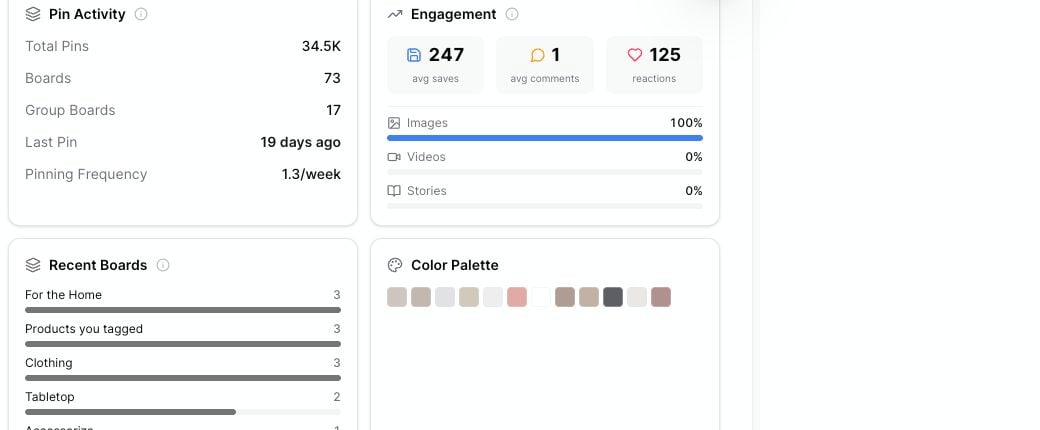 Use these cards to compare profiles quickly:
* **Pin Activity:** Total pins, boards, group boards, last pin date, and pinning frequency.
* **Engagement:** Average saves, average comments, reactions, and content mix.
* **Recent Boards:** Boards that appear most often in recent pins.
* **Color Palette:** Common colors from recent pin images.
* **Recent Topics:** Pinterest topic labels connected to recent pins.
## Sort top performing pins
The **Top Performing Pins** section shows recent pins Pinsearch can read for the profile.
Use these cards to compare profiles quickly:
* **Pin Activity:** Total pins, boards, group boards, last pin date, and pinning frequency.
* **Engagement:** Average saves, average comments, reactions, and content mix.
* **Recent Boards:** Boards that appear most often in recent pins.
* **Color Palette:** Common colors from recent pin images.
* **Recent Topics:** Pinterest topic labels connected to recent pins.
## Sort top performing pins
The **Top Performing Pins** section shows recent pins Pinsearch can read for the profile.
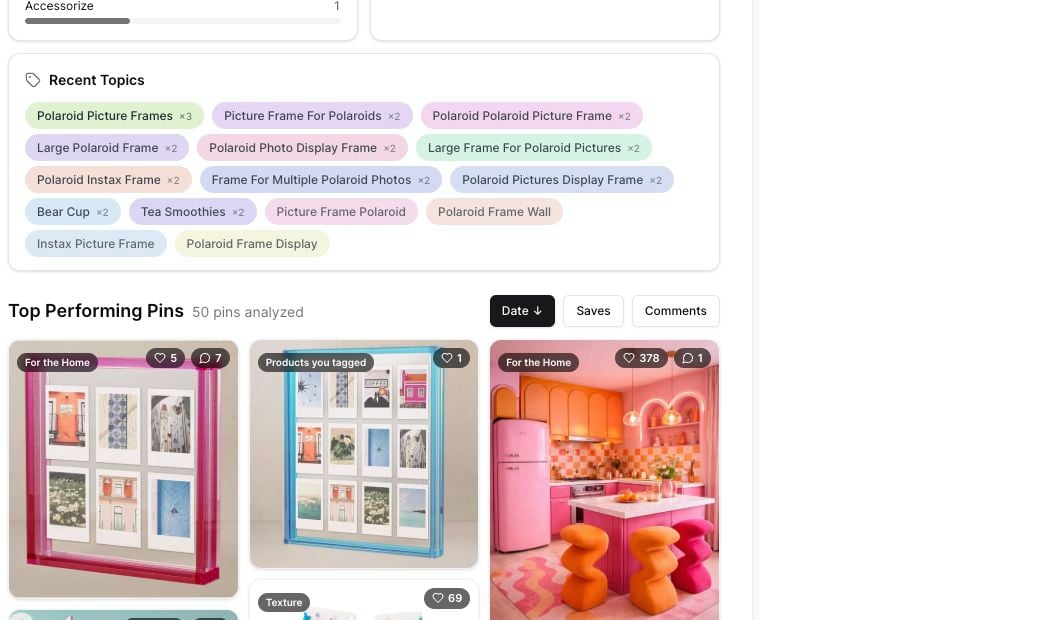 Use **Date** when you want the newest examples. Use **Saves** when you want ideas people are saving. Use **Comments** when you want pins that started more conversation.
## Save profiles to Projects
Click **Add to Project** when you want to keep a profile with the rest of your research.
Saved profiles are useful when you are building a competitor list, planning a content cluster, or collecting examples for a client or campaign.
## Related guides
* [Search for a Pinterest profile](/pinsearch-product-guides/profile-explorer/search-for-a-pinterest-profile)
* [Analyze recent pin performance](/pinsearch-product-guides/profile-explorer/analyze-recent-pin-performance)
* [Understand profile header metrics](/pinsearch-product-guides/profile-explorer/understand-profile-header-metrics)
* [Save competitor profiles to Projects](/pinsearch-product-guides/profile-explorer/save-competitor-profiles-to-projects)
## Troubleshooting
Your account may not have active access. Profile Explorer requires active access through a free trial, active subscription, or lifetime license.
Check the spelling, remove extra text, or paste the full Pinterest profile URL. The profile may also be removed, suspended, or unavailable.
Profile-level details may still appear even when recent pins are unavailable. Refresh the page, try again later, or test another public profile.
Not every Pinterest profile connects a website. If no domain appears in the header, use the profile link and recent pin destinations instead.
Use **Date** when you want the newest examples. Use **Saves** when you want ideas people are saving. Use **Comments** when you want pins that started more conversation.
## Save profiles to Projects
Click **Add to Project** when you want to keep a profile with the rest of your research.
Saved profiles are useful when you are building a competitor list, planning a content cluster, or collecting examples for a client or campaign.
## Related guides
* [Search for a Pinterest profile](/pinsearch-product-guides/profile-explorer/search-for-a-pinterest-profile)
* [Analyze recent pin performance](/pinsearch-product-guides/profile-explorer/analyze-recent-pin-performance)
* [Understand profile header metrics](/pinsearch-product-guides/profile-explorer/understand-profile-header-metrics)
* [Save competitor profiles to Projects](/pinsearch-product-guides/profile-explorer/save-competitor-profiles-to-projects)
## Troubleshooting
Your account may not have active access. Profile Explorer requires active access through a free trial, active subscription, or lifetime license.
Check the spelling, remove extra text, or paste the full Pinterest profile URL. The profile may also be removed, suspended, or unavailable.
Profile-level details may still appear even when recent pins are unavailable. Refresh the page, try again later, or test another public profile.
Not every Pinterest profile connects a website. If no domain appears in the header, use the profile link and recent pin destinations instead.