> ## Documentation Index
> Fetch the complete documentation index at: https://docs.pinsearch.co/llms.txt
> Use this file to discover all available pages before exploring further.
# Copy and use profile domain information
> Use verified domain information from Profile Explorer when researching competitors.
Some Pinterest profiles show a connected website in the Profile Explorer header.
Use this domain information to connect a Pinterest account to a blog, shop, portfolio, or brand website during competitor research.
 ## Where the domain appears
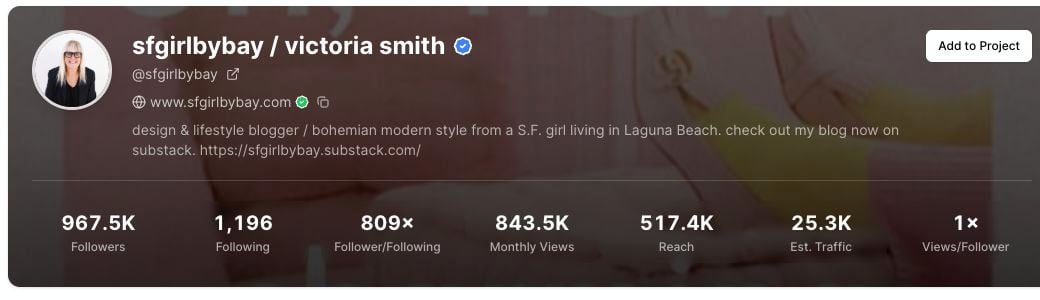
When available, the domain appears near the top of the profile report, under the username and profile link.
The domain row may include:
* The website domain.
* A verification marker when the Pinterest profile shows a verified domain.
* A copy icon.
Not every profile has a domain. If the profile does not show one, use the Pinterest profile link and recent pin destinations instead.
## Copy the domain
Search for the Pinterest profile in **Profile Explorer**.
Look under the username in the profile header.
Click the copy icon beside the domain.
After copying, Pinsearch shows a confirmation message that the domain URL was copied to your clipboard.
## How to use domain information
Domain information is helpful when you want to understand the business or website behind a Pinterest profile.
You can use it to:
* Visit the competitor's website.
* Compare their Pinterest content with their blog or shop.
* Save the domain in a research note.
* Group profiles by brand, blog, or business.
* Check whether strong pins are sending people to the same website.
## Verified domains
A verified domain marker means the domain is connected to the Pinterest profile.
Use this as a helpful trust signal when you are matching a Pinterest account to a website. It does not mean Pinsearch owns, controls, or endorses that website.
## If copying does not work
If the copy action does not work:
1. Try clicking the copy icon again.
2. Check whether your browser blocked clipboard access.
3. Select and copy the domain manually if needed.
## Related guides
* [Understand profile header metrics](/pinsearch-product-guides/profile-explorer/understand-profile-header-metrics)
* [Analyze recent pin performance](/pinsearch-product-guides/profile-explorer/analyze-recent-pin-performance)
* [Save competitor profiles to Projects](/pinsearch-product-guides/profile-explorer/save-competitor-profiles-to-projects)
* [Profile Explorer](/pinsearch-product-guides/profile-explorer/profile-explorer)
## Where the domain appears
When available, the domain appears near the top of the profile report, under the username and profile link.
The domain row may include:
* The website domain.
* A verification marker when the Pinterest profile shows a verified domain.
* A copy icon.
Not every profile has a domain. If the profile does not show one, use the Pinterest profile link and recent pin destinations instead.
## Copy the domain
Search for the Pinterest profile in **Profile Explorer**.
Look under the username in the profile header.
Click the copy icon beside the domain.
After copying, Pinsearch shows a confirmation message that the domain URL was copied to your clipboard.
## How to use domain information
Domain information is helpful when you want to understand the business or website behind a Pinterest profile.
You can use it to:
* Visit the competitor's website.
* Compare their Pinterest content with their blog or shop.
* Save the domain in a research note.
* Group profiles by brand, blog, or business.
* Check whether strong pins are sending people to the same website.
## Verified domains
A verified domain marker means the domain is connected to the Pinterest profile.
Use this as a helpful trust signal when you are matching a Pinterest account to a website. It does not mean Pinsearch owns, controls, or endorses that website.
## If copying does not work
If the copy action does not work:
1. Try clicking the copy icon again.
2. Check whether your browser blocked clipboard access.
3. Select and copy the domain manually if needed.
## Related guides
* [Understand profile header metrics](/pinsearch-product-guides/profile-explorer/understand-profile-header-metrics)
* [Analyze recent pin performance](/pinsearch-product-guides/profile-explorer/analyze-recent-pin-performance)
* [Save competitor profiles to Projects](/pinsearch-product-guides/profile-explorer/save-competitor-profiles-to-projects)
* [Profile Explorer](/pinsearch-product-guides/profile-explorer/profile-explorer)