> ## Documentation Index
> Fetch the complete documentation index at: https://docs.pinsearch.co/llms.txt
> Use this file to discover all available pages before exploring further.
# Analyze recent pin performance
> Use recent pins to understand a Pinterest profile's content performance.
Profile Explorer helps you understand what a Pinterest profile has published recently and which pins appear to be getting the most engagement.
Use this guide when you want to compare competitors, find content patterns, or decide which pin ideas are worth saving for later.
## What Profile Explorer analyzes
Profile Explorer reviews recent pins that are available for the profile. On the profile page, the **Top Performing Pins** section shows how many pins were analyzed.
For many profiles, you will see a recent sample such as **50 pins analyzed**.
Recent pin performance is best for spotting patterns. It is not a replacement for the account owner's private Pinterest analytics.
## Read the engagement card
The **Engagement** card summarizes how recent pins are performing on average.
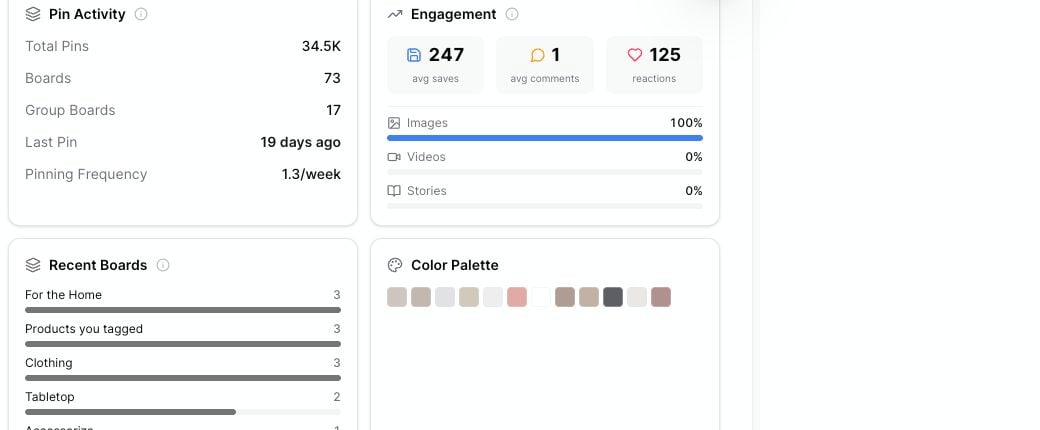 The card can show:
* **Avg saves:** The average number of saves across the recent pins Pinsearch analyzed.
* **Avg comments:** The average number of comments across those recent pins.
* **Reactions:** The total reactions found in the recent pin sample.
* **Images, Videos, Stories:** The content type mix for the recent pins.
Use these numbers to compare profiles in the same niche. A profile with fewer followers but strong average saves may still be worth studying.
## Review pin activity
The **Pin Activity** card gives you context before you judge performance.
Look at:
* **Total Pins:** How much content the profile has published overall.
* **Boards:** How many boards the profile uses.
* **Group Boards:** How many group boards appear for the profile.
* **Last Pin:** How recently the profile pinned.
* **Pinning Frequency:** How often the profile appears to publish.
Compare engagement together with activity. A profile that pins often may have more chances to get saves, while a profile that pins rarely may rely on stronger individual pins.
## Sort top performing pins
The **Top Performing Pins** section shows recent pin examples with their visible engagement.
The card can show:
* **Avg saves:** The average number of saves across the recent pins Pinsearch analyzed.
* **Avg comments:** The average number of comments across those recent pins.
* **Reactions:** The total reactions found in the recent pin sample.
* **Images, Videos, Stories:** The content type mix for the recent pins.
Use these numbers to compare profiles in the same niche. A profile with fewer followers but strong average saves may still be worth studying.
## Review pin activity
The **Pin Activity** card gives you context before you judge performance.
Look at:
* **Total Pins:** How much content the profile has published overall.
* **Boards:** How many boards the profile uses.
* **Group Boards:** How many group boards appear for the profile.
* **Last Pin:** How recently the profile pinned.
* **Pinning Frequency:** How often the profile appears to publish.
Compare engagement together with activity. A profile that pins often may have more chances to get saves, while a profile that pins rarely may rely on stronger individual pins.
## Sort top performing pins
The **Top Performing Pins** section shows recent pin examples with their visible engagement.
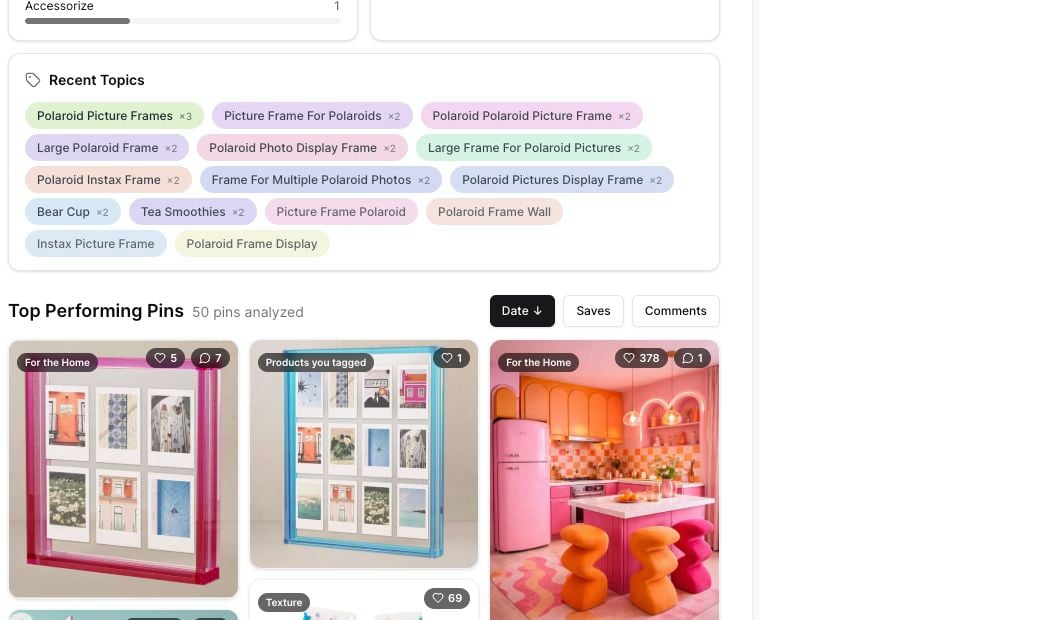 You can sort by:
* **Date:** See the newest pins first.
* **Saves:** Find pins people are saving most.
* **Comments:** Find pins that received more discussion.
Click a pin card to open the pin on Pinterest in a new tab.
## What to look for
As you review recent pins, look for patterns you can apply to your own planning:
* Which topics keep appearing?
* Which boards contain the strongest pins?
* Do strong pins use a similar image style?
* Are saves coming from practical ideas, inspiration, tutorials, or product examples?
* Does the profile rely mostly on images, videos, or another format?
You do not need to copy a competitor. The goal is to understand what Pinterest users in that niche seem to respond to.
## If recent pins are unavailable
Sometimes the profile header loads but recent pins do not.
That usually means Pinsearch could read some profile details, but the recent pin sample was unavailable at that moment. Refresh the page, try again later, or search another public profile.
## Related guides
* [Why recent pins may not load in Profile Explorer](/pinsearch-product-guides/profile-explorer/recent-pins-not-loading)
* [Use board distribution, recent topics, and color palette](/pinsearch-product-guides/profile-explorer/use-board-distribution-recent-topics-and-color-palette)
* [Understand profile header metrics](/pinsearch-product-guides/profile-explorer/understand-profile-header-metrics)
* [Save competitor profiles to Projects](/pinsearch-product-guides/profile-explorer/save-competitor-profiles-to-projects)
You can sort by:
* **Date:** See the newest pins first.
* **Saves:** Find pins people are saving most.
* **Comments:** Find pins that received more discussion.
Click a pin card to open the pin on Pinterest in a new tab.
## What to look for
As you review recent pins, look for patterns you can apply to your own planning:
* Which topics keep appearing?
* Which boards contain the strongest pins?
* Do strong pins use a similar image style?
* Are saves coming from practical ideas, inspiration, tutorials, or product examples?
* Does the profile rely mostly on images, videos, or another format?
You do not need to copy a competitor. The goal is to understand what Pinterest users in that niche seem to respond to.
## If recent pins are unavailable
Sometimes the profile header loads but recent pins do not.
That usually means Pinsearch could read some profile details, but the recent pin sample was unavailable at that moment. Refresh the page, try again later, or search another public profile.
## Related guides
* [Why recent pins may not load in Profile Explorer](/pinsearch-product-guides/profile-explorer/recent-pins-not-loading)
* [Use board distribution, recent topics, and color palette](/pinsearch-product-guides/profile-explorer/use-board-distribution-recent-topics-and-color-palette)
* [Understand profile header metrics](/pinsearch-product-guides/profile-explorer/understand-profile-header-metrics)
* [Save competitor profiles to Projects](/pinsearch-product-guides/profile-explorer/save-competitor-profiles-to-projects)