> ## Documentation Index
> Fetch the complete documentation index at: https://docs.pinsearch.co/llms.txt
> Use this file to discover all available pages before exploring further.
# Use Pinterest annotations and search volume
> Use Pinterest smart labels and estimated volume from Pin Explorer.
Annotations are Pinterest smart labels that describe how Pinterest categorizes a pin.
In Pin Explorer, annotations can help you understand the topics, styles, and search language connected to a pin.
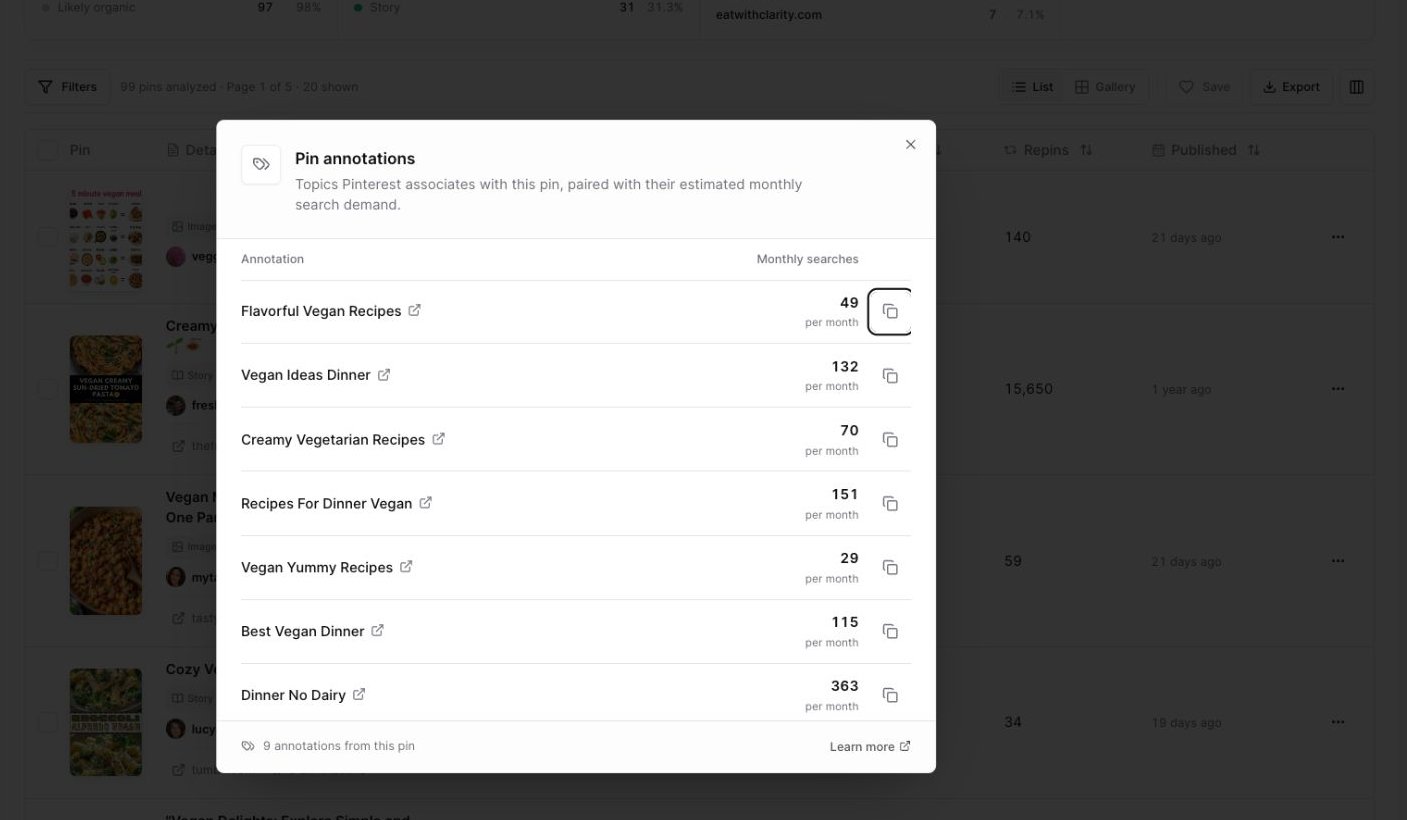 ## Open annotations
Search by keyword or paste Pin URLs.
Look in the **Details** column for an annotations button, such as **9 annotations**.
Click the annotations button.
The modal shows labels connected to that pin.
## Understand monthly searches
Each label can show estimated monthly searches.
Use this number as a directional signal for demand, not as an exact promise of traffic.
For example:
* A label with higher estimated volume may represent a broader Pinterest idea.
* A label with lower estimated volume may be more specific.
* A label marked unavailable can still be useful as a descriptive phrase, especially for creative wording.
## Use annotations in your content
Annotations can help you improve:
* Pin titles
* Pin descriptions
* Board names
* Article headings
* Topic angles
* Visual themes
For example, if several top pins include labels around cozy bedroom ideas, room inspo, and interior inspiration, those phrases can help you understand how Pinterest groups the topic.
Do not stuff every annotation into one pin description. Pick the labels that genuinely match your pin and your audience.
## Copy an annotation
Each annotation includes a copy icon.
Click the copy icon beside a label when you want to use the phrase in your planning notes, Project brief, or content draft.
Pinsearch shows a copied message after the label is copied.
## Open the Pinterest idea page
Annotation labels link to Pinterest idea pages.
Open a label when you want to explore related Pinterest results and understand how the topic appears on Pinterest outside Pinsearch.
## What annotations are good for
Use annotations when you want to:
* Find related words Pinterest associates with a pin.
* Understand the language around a visual style.
* Compare labels across several top pins.
* Spot recurring content angles.
* Improve your own pin title or description.
## What annotations are not
Annotations are not a guarantee that your pin will rank.
They are research clues. Your pin still needs to match the content, look useful, and serve the person searching or browsing.
## Related guides
* [Understand pin metrics](/pinsearch-product-guides/pin-explorer/understand-pin-metrics)
* [Explore top pins by keyword](/pinsearch-product-guides/pin-explorer/explore-top-pins-by-keyword)
* [Save and export pins from Pin Explorer](/pinsearch-product-guides/pin-explorer/save-and-export-pins-from-pin-explorer)
## Open annotations
Search by keyword or paste Pin URLs.
Look in the **Details** column for an annotations button, such as **9 annotations**.
Click the annotations button.
The modal shows labels connected to that pin.
## Understand monthly searches
Each label can show estimated monthly searches.
Use this number as a directional signal for demand, not as an exact promise of traffic.
For example:
* A label with higher estimated volume may represent a broader Pinterest idea.
* A label with lower estimated volume may be more specific.
* A label marked unavailable can still be useful as a descriptive phrase, especially for creative wording.
## Use annotations in your content
Annotations can help you improve:
* Pin titles
* Pin descriptions
* Board names
* Article headings
* Topic angles
* Visual themes
For example, if several top pins include labels around cozy bedroom ideas, room inspo, and interior inspiration, those phrases can help you understand how Pinterest groups the topic.
Do not stuff every annotation into one pin description. Pick the labels that genuinely match your pin and your audience.
## Copy an annotation
Each annotation includes a copy icon.
Click the copy icon beside a label when you want to use the phrase in your planning notes, Project brief, or content draft.
Pinsearch shows a copied message after the label is copied.
## Open the Pinterest idea page
Annotation labels link to Pinterest idea pages.
Open a label when you want to explore related Pinterest results and understand how the topic appears on Pinterest outside Pinsearch.
## What annotations are good for
Use annotations when you want to:
* Find related words Pinterest associates with a pin.
* Understand the language around a visual style.
* Compare labels across several top pins.
* Spot recurring content angles.
* Improve your own pin title or description.
## What annotations are not
Annotations are not a guarantee that your pin will rank.
They are research clues. Your pin still needs to match the content, look useful, and serve the person searching or browsing.
## Related guides
* [Understand pin metrics](/pinsearch-product-guides/pin-explorer/understand-pin-metrics)
* [Explore top pins by keyword](/pinsearch-product-guides/pin-explorer/explore-top-pins-by-keyword)
* [Save and export pins from Pin Explorer](/pinsearch-product-guides/pin-explorer/save-and-export-pins-from-pin-explorer)