> ## Documentation Index
> Fetch the complete documentation index at: https://docs.pinsearch.co/llms.txt
> Use this file to discover all available pages before exploring further.
# Explore top pins by keyword
> Use a Pinterest keyword to find top-performing pins.
Use **Keyword** mode when you want to see which pins are already showing up for a Pinterest topic.
This is helpful after you find a keyword in Keyword Finder, plan a new Pinterest campaign, or want creative ideas before making a pin.
 ## Search for top pins
Open **Pin Explorer** from the Research section.
**Keyword** is selected by default.
Type a topic into the keyword field. For example, search `vegan meals`.
Click **Search**.
While Pinsearch is loading, the button changes to **Searching**.
When results are ready, the page shows summary cards and the first page of matching pins.
## Choose a good keyword to search
Start broad enough that Pinterest has real content for the topic.
Good starting examples:
* `vegan meals`
* `bedroom decor`
* `summer outfits`
* `healthy dinner`
* `fall nails`
If the topic is very narrow, search the parent topic first. For example, search `bedroom decor` before `small cozy sage green bedroom shelf ideas`.
## Review the summary
The summary cards help you understand the result set before you inspect individual pins.
Look at:
* **Commercial signals** to see whether results include shopping, paid, affiliate, sponsored, or likely organic pins.
* **Format mix** to see whether the topic leans toward image, video, carousel, or story pins.
* **Outbound destinations** to see how many pins link to an outside website.
* **Source concentration** to see whether a few sources dominate the results.
## Review the results
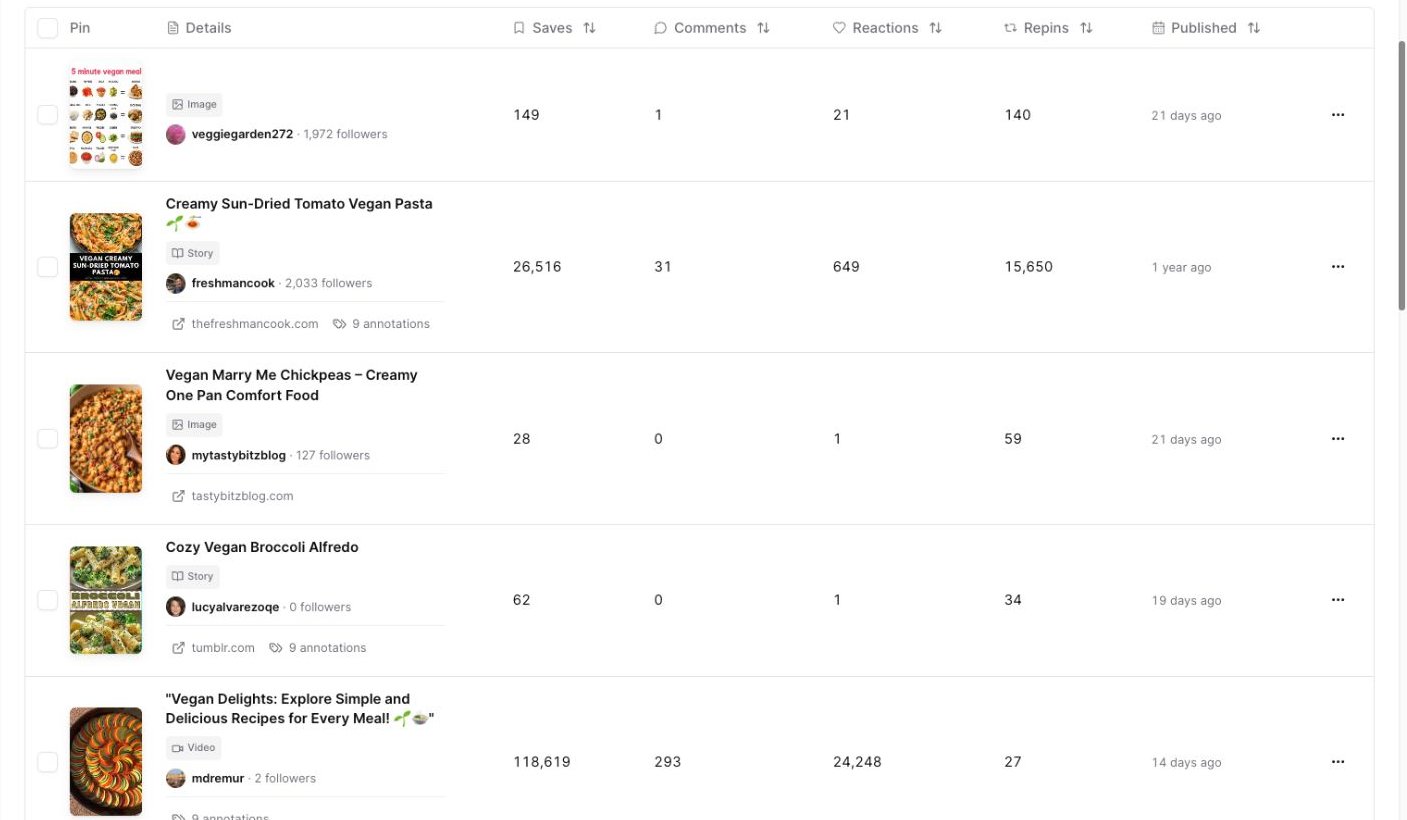
Each row shows one pin, with the pin image, title, pinner, follower count, published date, and engagement metrics.
Use the table to look for:
* Pin styles that appear often.
* Titles and angles that match the topic.
* Pins with strong saves or repins.
* Recently published pins that are already getting engagement.
* Pinners or profiles worth reviewing later.
## Filter the results
Click **Filters** when you want to narrow the result set.
## Search for top pins
Open **Pin Explorer** from the Research section.
**Keyword** is selected by default.
Type a topic into the keyword field. For example, search `vegan meals`.
Click **Search**.
While Pinsearch is loading, the button changes to **Searching**.
When results are ready, the page shows summary cards and the first page of matching pins.
## Choose a good keyword to search
Start broad enough that Pinterest has real content for the topic.
Good starting examples:
* `vegan meals`
* `bedroom decor`
* `summer outfits`
* `healthy dinner`
* `fall nails`
If the topic is very narrow, search the parent topic first. For example, search `bedroom decor` before `small cozy sage green bedroom shelf ideas`.
## Review the summary
The summary cards help you understand the result set before you inspect individual pins.
Look at:
* **Commercial signals** to see whether results include shopping, paid, affiliate, sponsored, or likely organic pins.
* **Format mix** to see whether the topic leans toward image, video, carousel, or story pins.
* **Outbound destinations** to see how many pins link to an outside website.
* **Source concentration** to see whether a few sources dominate the results.
## Review the results
Each row shows one pin, with the pin image, title, pinner, follower count, published date, and engagement metrics.
Use the table to look for:
* Pin styles that appear often.
* Titles and angles that match the topic.
* Pins with strong saves or repins.
* Recently published pins that are already getting engagement.
* Pinners or profiles worth reviewing later.
## Filter the results
Click **Filters** when you want to narrow the result set.
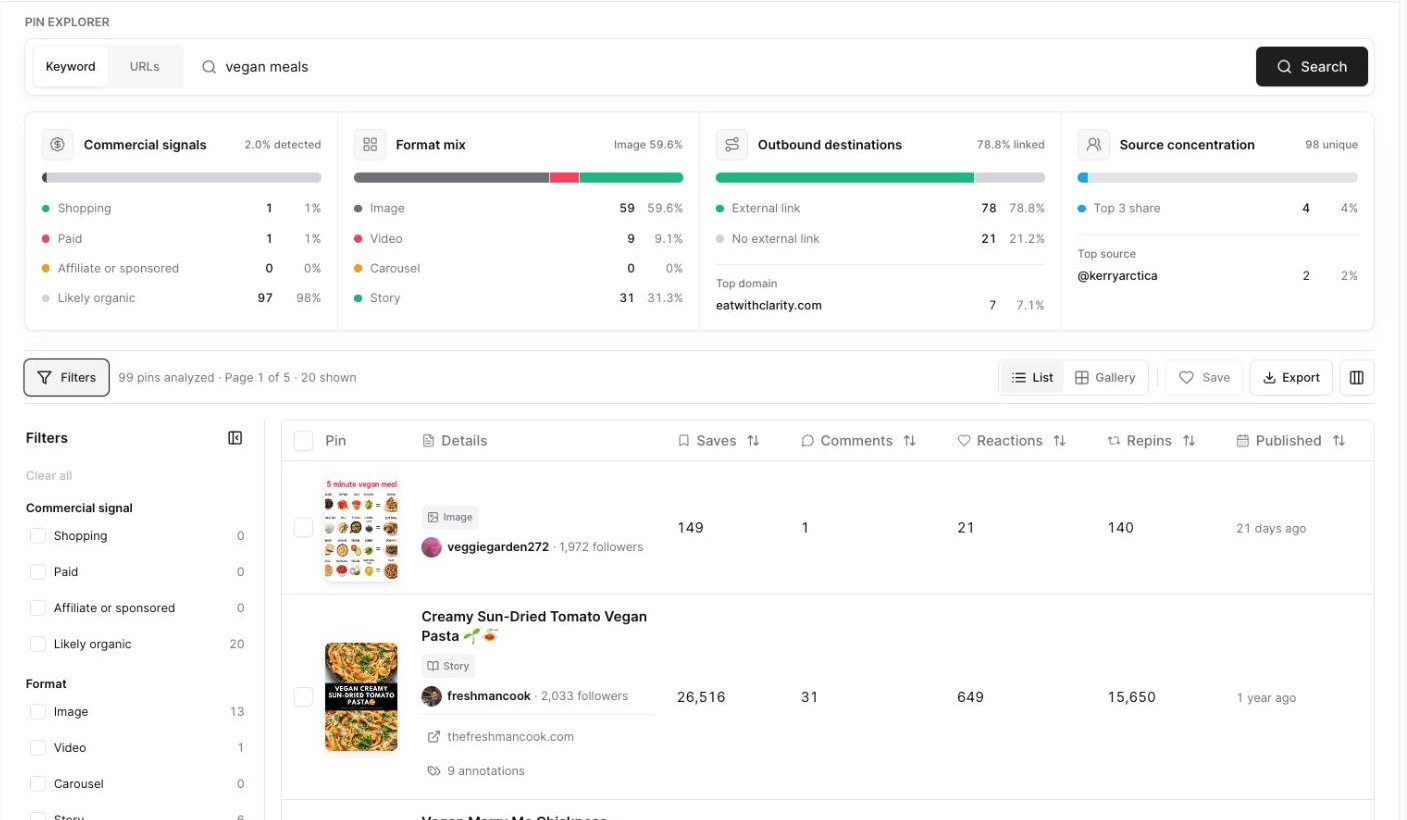 Useful filters include:
* **Commercial signal** when you want to compare organic-looking pins against shopping, paid, or sponsored pins.
* **Format** when you only want image, video, carousel, or story pins.
* **Destination** when you want pins that link to outside websites.
* **Published date** when you want newer examples.
* **Minimum saves** when you want pins that have already been saved often.
## Sort top pins
Click a sortable header to compare the pins.
Useful sorting workflows:
* Sort **Saves** to find pins people save often.
* Sort **Comments** to find pins with discussion.
* Sort **Reactions** to find pins that get quick engagement.
* Sort **Repins** to find pins being shared again.
* Sort **Published** to compare newer and older results.
## Use gallery view
Click **Gallery** when you want to scan pin designs visually.
Gallery view is useful when you want to study:
* Text overlay styles.
* Image angles.
* Repeated colors or layouts.
* Which pins look easiest to understand at a glance.
## Save useful pins
Select the checkbox beside each pin you want to keep, then click **Save**.
Use Projects to keep examples for a blog post, campaign, client, seasonal board, or competitor research session.
## Export the results
Click **Export** when you want a CSV file.
Useful filters include:
* **Commercial signal** when you want to compare organic-looking pins against shopping, paid, or sponsored pins.
* **Format** when you only want image, video, carousel, or story pins.
* **Destination** when you want pins that link to outside websites.
* **Published date** when you want newer examples.
* **Minimum saves** when you want pins that have already been saved often.
## Sort top pins
Click a sortable header to compare the pins.
Useful sorting workflows:
* Sort **Saves** to find pins people save often.
* Sort **Comments** to find pins with discussion.
* Sort **Reactions** to find pins that get quick engagement.
* Sort **Repins** to find pins being shared again.
* Sort **Published** to compare newer and older results.
## Use gallery view
Click **Gallery** when you want to scan pin designs visually.
Gallery view is useful when you want to study:
* Text overlay styles.
* Image angles.
* Repeated colors or layouts.
* Which pins look easiest to understand at a glance.
## Save useful pins
Select the checkbox beside each pin you want to keep, then click **Save**.
Use Projects to keep examples for a blog post, campaign, client, seasonal board, or competitor research session.
## Export the results
Click **Export** when you want a CSV file.
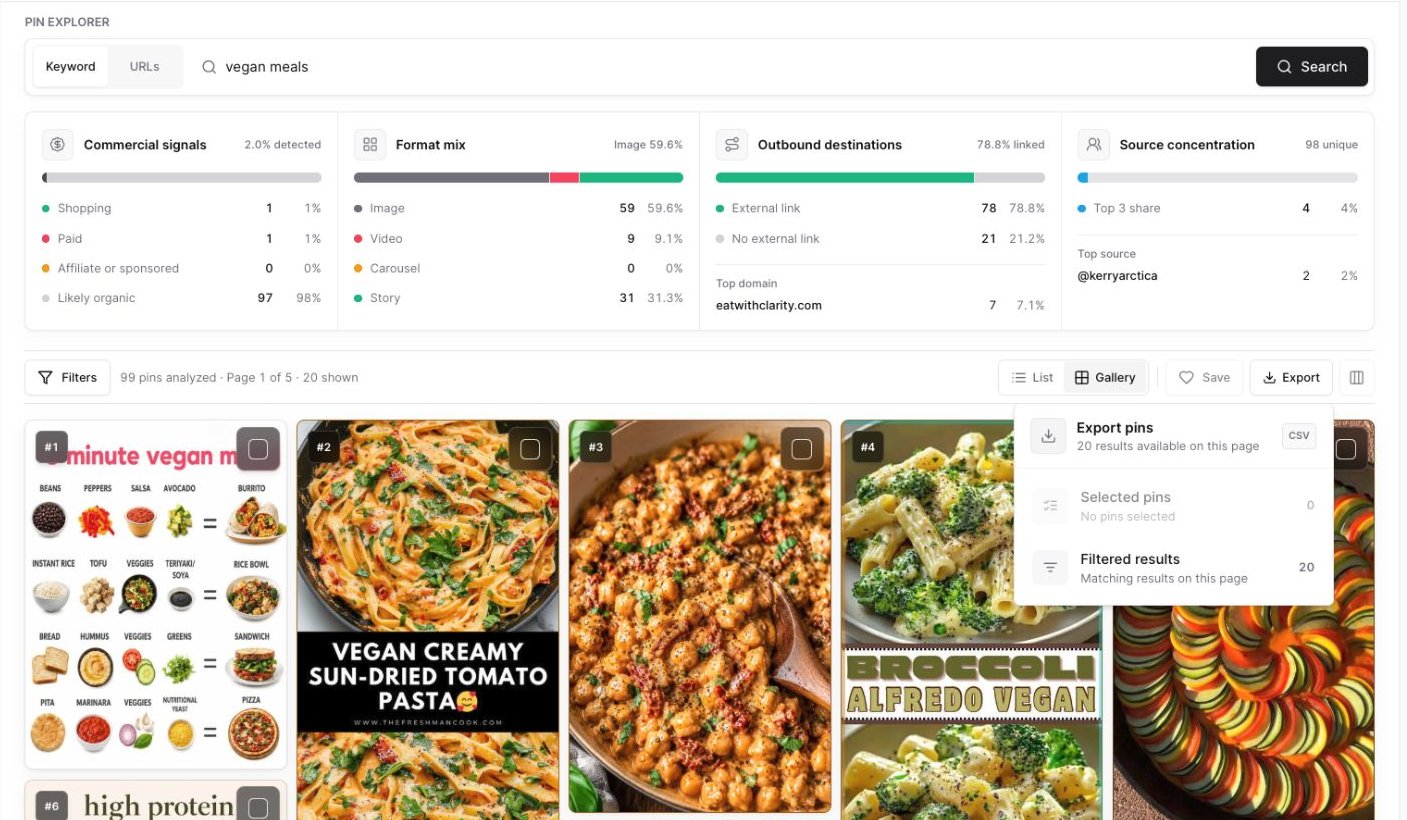 You can export:
* **Selected pins:** Only the rows you checked.
* **Filtered results:** The matching pins currently shown on the page.
In a paged keyword search, move to another page if you want to review or export more pins.
## What to do after the search
After you review top pins:
1. Save your strongest examples to a Project.
2. Open high-performing pins on Pinterest if you want to inspect the live pin.
3. Review linked articles when available.
4. Use annotations to find related Pinterest wording.
5. Use what you learn to shape your own pin title, description, image, or article angle.
Use Pin Explorer for creative research, not copying. Look for patterns, then make your own pin more useful and specific for your audience.
## Related guides
* [Understand pin metrics](/pinsearch-product-guides/pin-explorer/understand-pin-metrics)
* [Use Pinterest annotations and search volume](/pinsearch-product-guides/pin-explorer/pinterest-annotations-and-search-volume)
* [Save and export pins from Pin Explorer](/pinsearch-product-guides/pin-explorer/save-and-export-pins-from-pin-explorer)
* [Open Pin Explorer from a keyword](/pinsearch-product-guides/keyword-research/open-pin-explorer-from-a-keyword)
You can export:
* **Selected pins:** Only the rows you checked.
* **Filtered results:** The matching pins currently shown on the page.
In a paged keyword search, move to another page if you want to review or export more pins.
## What to do after the search
After you review top pins:
1. Save your strongest examples to a Project.
2. Open high-performing pins on Pinterest if you want to inspect the live pin.
3. Review linked articles when available.
4. Use annotations to find related Pinterest wording.
5. Use what you learn to shape your own pin title, description, image, or article angle.
Use Pin Explorer for creative research, not copying. Look for patterns, then make your own pin more useful and specific for your audience.
## Related guides
* [Understand pin metrics](/pinsearch-product-guides/pin-explorer/understand-pin-metrics)
* [Use Pinterest annotations and search volume](/pinsearch-product-guides/pin-explorer/pinterest-annotations-and-search-volume)
* [Save and export pins from Pin Explorer](/pinsearch-product-guides/pin-explorer/save-and-export-pins-from-pin-explorer)
* [Open Pin Explorer from a keyword](/pinsearch-product-guides/keyword-research/open-pin-explorer-from-a-keyword)