> ## Documentation Index
> Fetch the complete documentation index at: https://docs.pinsearch.co/llms.txt
> Use this file to discover all available pages before exploring further.
# Open Pin Explorer from a keyword
> Continue from Keyword Finder into Pin Explorer to inspect top pins for a keyword.
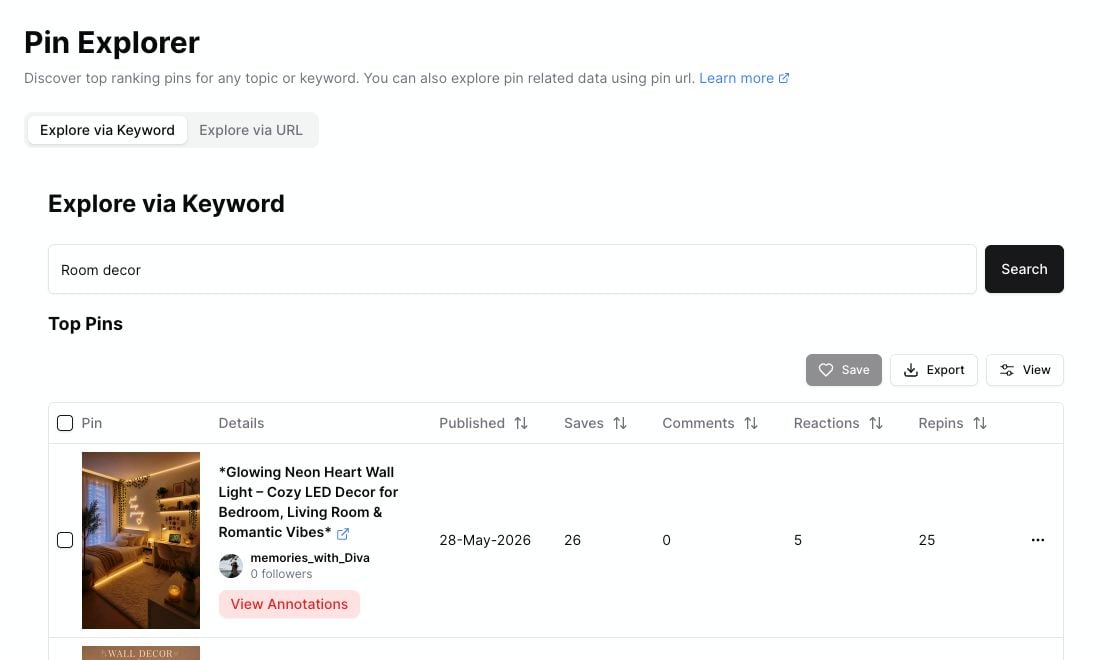
When a keyword looks promising, open it in Pin Explorer to see the top pins ranking for that topic.
This helps you move from keyword research into pin-level research without retyping the keyword.
 ## Open Pin Explorer from a row
Search for a topic in **Keyword Finder**.
Look for a keyword with useful estimated volume, reasonable difficulty, or a strong fit for your content plan.
Hover over the keyword. Pinsearch shows quick actions beside the keyword.
Click the **View top pins** icon.
Pin Explorer opens with that keyword already entered.
## When to use Pin Explorer
Use Pin Explorer when you want to know what is actually ranking for a keyword.
It can help you answer:
* What do top pins look like?
* Which pins have the most saves, comments, reactions, or repins?
* Are the top results fresh or older?
* Which pinners are showing up often?
* Are there linked articles or profiles worth reviewing?
## What to do after opening Pin Explorer
After Pin Explorer loads:
1. Review the top pins.
2. Sort by saves, comments, reactions, or repins if needed.
3. Open any pins you want to inspect more closely.
4. Save useful pins to a Project.
5. Export pin research if you want to work outside Pinsearch.
Use Keyword Finder to choose the topic, then use Pin Explorer to understand the creative angle.
## Related guides
* [Explore top pins by keyword](/pinsearch-product-guides/pin-explorer/explore-top-pins-by-keyword)
* [Understand pin metrics](/pinsearch-product-guides/pin-explorer/understand-pin-metrics)
* [Save and export pins from Pin Explorer](/pinsearch-product-guides/pin-explorer/save-and-export-pins-from-pin-explorer)
## Open Pin Explorer from a row
Search for a topic in **Keyword Finder**.
Look for a keyword with useful estimated volume, reasonable difficulty, or a strong fit for your content plan.
Hover over the keyword. Pinsearch shows quick actions beside the keyword.
Click the **View top pins** icon.
Pin Explorer opens with that keyword already entered.
## When to use Pin Explorer
Use Pin Explorer when you want to know what is actually ranking for a keyword.
It can help you answer:
* What do top pins look like?
* Which pins have the most saves, comments, reactions, or repins?
* Are the top results fresh or older?
* Which pinners are showing up often?
* Are there linked articles or profiles worth reviewing?
## What to do after opening Pin Explorer
After Pin Explorer loads:
1. Review the top pins.
2. Sort by saves, comments, reactions, or repins if needed.
3. Open any pins you want to inspect more closely.
4. Save useful pins to a Project.
5. Export pin research if you want to work outside Pinsearch.
Use Keyword Finder to choose the topic, then use Pin Explorer to understand the creative angle.
## Related guides
* [Explore top pins by keyword](/pinsearch-product-guides/pin-explorer/explore-top-pins-by-keyword)
* [Understand pin metrics](/pinsearch-product-guides/pin-explorer/understand-pin-metrics)
* [Save and export pins from Pin Explorer](/pinsearch-product-guides/pin-explorer/save-and-export-pins-from-pin-explorer)