> ## Documentation Index
> Fetch the complete documentation index at: https://docs.pinsearch.co/llms.txt
> Use this file to discover all available pages before exploring further.
# Test and turn on an automation
> Inspect one real result before starting recurring work.
Use **Test run** to see one item move through your configured flow before turning on recurring work.
Check that **What will happen** shows **Ready**. Review the source, destinations, weekly run time and credit cost.
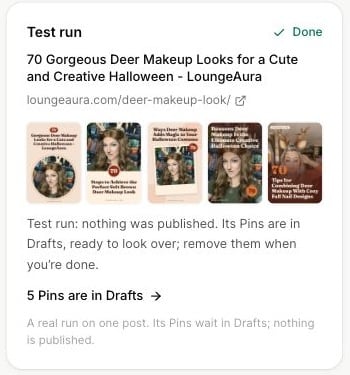
Click **Test run**. Follow the panel as it reads a post or topic and creates the result. If the flow includes **Wait for my OK**, use **Approve** or **Skip** in the test panel.
Open the generated article or the link to Pins in Drafts. Check content, designs, copy and boards. Update the flow if the result is unsuitable.
Click **Turn on**, review the final summary and confirm **Turn it on**. The confirmation shows the first run time. The automation's page then shows its schedule and results.
 ## What a test does
The test processes one real source item. Article writing uses real credits. Generated articles remain editable, and generated Pins remain in Drafts. The test does not publish the article to WordPress or publish Pins to Pinterest.
For an article that has not been published, its test Pins may have no destination link yet. Add the eventual public post URL before scheduling them.
Test output remains in your account. Review or remove unwanted drafts so they are not accidentally scheduled later.
## Free and paid access
Free includes one automation test run in total. This allowance does not reset daily or monthly. Turning on recurring runs requires a subscription or Lifetime access.
On paid or Lifetime accounts, repeated article tests still use credits. Adjusting the weekly plan does not refund content already generated.
## If the test fails
Read the panel's message. Check source availability, website photos, destination connections, template compatibility and credit balance. Fix the flow before retrying.
See [monitoring and troubleshooting](/pinsearch-product-guides/automations/manage-and-troubleshoot-automations).
This documentation is built and hosted on [Mintlify](https://mintlify.com), a developer documentation platform.
## What a test does
The test processes one real source item. Article writing uses real credits. Generated articles remain editable, and generated Pins remain in Drafts. The test does not publish the article to WordPress or publish Pins to Pinterest.
For an article that has not been published, its test Pins may have no destination link yet. Add the eventual public post URL before scheduling them.
Test output remains in your account. Review or remove unwanted drafts so they are not accidentally scheduled later.
## Free and paid access
Free includes one automation test run in total. This allowance does not reset daily or monthly. Turning on recurring runs requires a subscription or Lifetime access.
On paid or Lifetime accounts, repeated article tests still use credits. Adjusting the weekly plan does not refund content already generated.
## If the test fails
Read the panel's message. Check source availability, website photos, destination connections, template compatibility and credit balance. Fix the flow before retrying.
See [monitoring and troubleshooting](/pinsearch-product-guides/automations/manage-and-troubleshoot-automations).
This documentation is built and hosted on [Mintlify](https://mintlify.com), a developer documentation platform.