> ## Documentation Index
> Fetch the complete documentation index at: https://docs.pinsearch.co/llms.txt
> Use this file to discover all available pages before exploring further.
# Review and approve automation results
> Add approval steps and choose what happens when you do not respond.
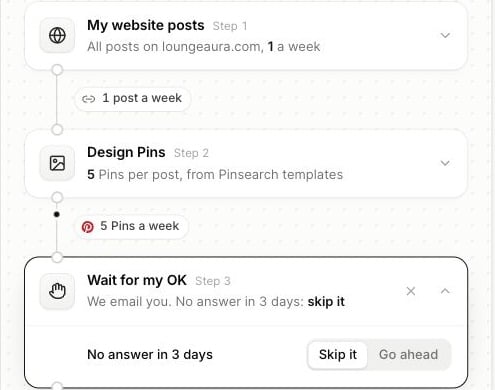
Add **Wait for my OK** when you want to review articles or Pins before the next step acts on them. Its position determines what you are approving.
For example, put it after **Write articles** to review an article before WordPress publication. Put another after **Design Pins** to review designs before scheduling.
 ## Respond to a review
On real runs, Pinsearch emails you when an item needs approval. Open the automation's page and review the waiting item.
* Open the article to read and edit it before approving.
* Review the generated Pin previews before allowing the scheduling step to continue.
* Choose **Approve** to continue that item through the remaining flow.
* Choose **Skip** to stop that item from progressing.
An approval applies to that item and step. A flow with two approval steps can ask again later for a different result.
## No answer in three days
Choose the timeout behavior in each **Wait for my OK** step:
| Choice | Result after three days without an answer |
| - | - |
| **Skip it** | The item is skipped instead of moving to the next action. |
| **Go ahead** | The item continues without an explicit approval. |
**Go ahead** can allow WordPress publication or Pinterest scheduling after the timeout. Choose **Skip it** when every item needs your explicit approval.
Skipping does not undo an earlier action. Place approval steps before publication or scheduling if those actions need your review.
## Approval during a test
The test panel also offers **Approve** and **Skip** when the test reaches a review step. This demonstrates the pause, while the test continues to keep final publication disabled.
See [testing](/pinsearch-product-guides/automations/test-and-activate-an-automation) and [building flows](/pinsearch-product-guides/automations/build-an-automation).
This documentation is built and hosted on [Mintlify](https://mintlify.com), a developer documentation platform.
## Respond to a review
On real runs, Pinsearch emails you when an item needs approval. Open the automation's page and review the waiting item.
* Open the article to read and edit it before approving.
* Review the generated Pin previews before allowing the scheduling step to continue.
* Choose **Approve** to continue that item through the remaining flow.
* Choose **Skip** to stop that item from progressing.
An approval applies to that item and step. A flow with two approval steps can ask again later for a different result.
## No answer in three days
Choose the timeout behavior in each **Wait for my OK** step:
| Choice | Result after three days without an answer |
| - | - |
| **Skip it** | The item is skipped instead of moving to the next action. |
| **Go ahead** | The item continues without an explicit approval. |
**Go ahead** can allow WordPress publication or Pinterest scheduling after the timeout. Choose **Skip it** when every item needs your explicit approval.
Skipping does not undo an earlier action. Place approval steps before publication or scheduling if those actions need your review.
## Approval during a test
The test panel also offers **Approve** and **Skip** when the test reaches a review step. This demonstrates the pause, while the test continues to keep final publication disabled.
See [testing](/pinsearch-product-guides/automations/test-and-activate-an-automation) and [building flows](/pinsearch-product-guides/automations/build-an-automation).
This documentation is built and hosted on [Mintlify](https://mintlify.com), a developer documentation platform.