> ## Documentation Index
> Fetch the complete documentation index at: https://docs.pinsearch.co/llms.txt
> Use this file to discover all available pages before exploring further.
# Use Automations
> Choose a recipe or build a workflow for articles and Pinterest Pins.
Automations repeat a workflow for you: select posts or topics, create content, wait for approval when requested, and send the results to WordPress or Pinterest.
Open **Automations → My automations** to choose a recipe or return to saved work.
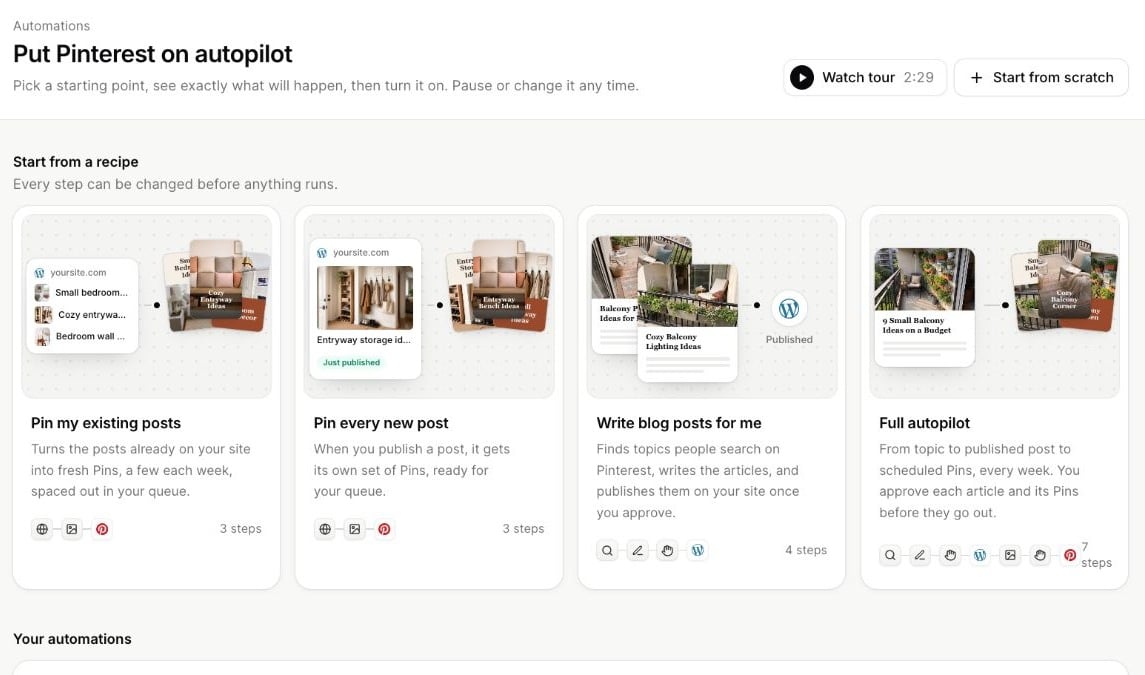 ## Choose a recipe
| Recipe | Starting workflow |
| - | - |
| **Pin my existing posts** | Read website posts, design Pins and send them to the queue. |
| **Pin every new post** | Use new posts from your website, design Pins and schedule them. |
| **Write blog posts for me** | Find Pinterest topics, write articles, wait for your approval and publish to WordPress. |
| **Full autopilot** | Find topics, write articles, request approval, publish to WordPress, design Pins, request approval again and schedule them. |
Every recipe can be changed before turning it on. Use **Start from scratch** if you already know the sequence you want.
## Before you start
Connect the destinations your flow needs. Pinterest Pin workflows need a Pinterest account; scheduled Pins need queue times. WordPress publication needs a connected site. Article writing needs enough credits.
Free users can build a flow and run one test. Running recurring automations is included with Basic, Plus, Pro and Lifetime. Publishing and article limits still apply to the output.
## Three stages
1. **Build:** Configure steps, review **What will happen**, choose the weekly run day and time, and check the credit estimate.
2. **Test:** Run one real item through the flow. Articles use credits and Pins are saved to Drafts; the test does not publish.
3. **Turn on:** Confirm the plan and let it run on the selected schedule. Monitor results and respond to approvals on the automation's page.
Choose sources, actions and destinations.
Understand test output before starting recurring runs.
Control what moves on and what happens after three days.
Review results and resolve paused workflows.
This documentation is built and hosted on [Mintlify](https://mintlify.com), a developer documentation platform.
## Choose a recipe
| Recipe | Starting workflow |
| - | - |
| **Pin my existing posts** | Read website posts, design Pins and send them to the queue. |
| **Pin every new post** | Use new posts from your website, design Pins and schedule them. |
| **Write blog posts for me** | Find Pinterest topics, write articles, wait for your approval and publish to WordPress. |
| **Full autopilot** | Find topics, write articles, request approval, publish to WordPress, design Pins, request approval again and schedule them. |
Every recipe can be changed before turning it on. Use **Start from scratch** if you already know the sequence you want.
## Before you start
Connect the destinations your flow needs. Pinterest Pin workflows need a Pinterest account; scheduled Pins need queue times. WordPress publication needs a connected site. Article writing needs enough credits.
Free users can build a flow and run one test. Running recurring automations is included with Basic, Plus, Pro and Lifetime. Publishing and article limits still apply to the output.
## Three stages
1. **Build:** Configure steps, review **What will happen**, choose the weekly run day and time, and check the credit estimate.
2. **Test:** Run one real item through the flow. Articles use credits and Pins are saved to Drafts; the test does not publish.
3. **Turn on:** Confirm the plan and let it run on the selected schedule. Monitor results and respond to approvals on the automation's page.
Choose sources, actions and destinations.
Understand test output before starting recurring runs.
Control what moves on and what happens after three days.
Review results and resolve paused workflows.
This documentation is built and hosted on [Mintlify](https://mintlify.com), a developer documentation platform.