> ## Documentation Index
> Fetch the complete documentation index at: https://docs.pinsearch.co/llms.txt
> Use this file to discover all available pages before exploring further.
# Set SEO fields before publishing
> Prepare the SEO title, meta description, and slug before sending an article to WordPress or exporting it.
The **SEO** tab helps you prepare the article for WordPress before you publish.
Use these fields to make the post easier to review, organize, and optimize in your WordPress site.
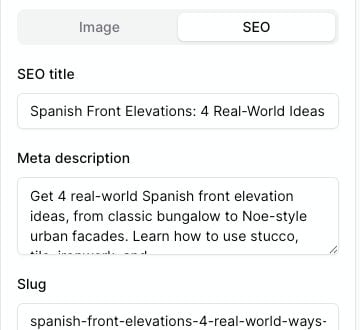 ## Open the SEO tab
1. Open the article in the Article Editor.
2. Find the **Publish** panel on the right.
3. Click the **SEO** tab.
You will see fields for **SEO title**, **Meta description**, and **Slug**.
## SEO title
The **SEO title** is the title you want search engines and SEO tools to use for the post.
Keep it clear and specific. A good SEO title usually includes the main topic and the reason someone should click.
Example:
* `Small Patio Garden Ideas for a Cozy Outdoor Space`
## Meta description
The **Meta description** is a short summary of the article.
Use it to explain what the reader will learn. Keep it natural and avoid stuffing in too many keywords.
Example:
* `Explore small patio garden ideas with simple layouts, container plants, and styling tips for a cozy outdoor space.`
## Slug
The **Slug** is the WordPress URL ending for the post.
Use a short, readable version of the topic. Separate words with hyphens.
Example:
* `small-patio-garden-ideas`
## What Pinsearch sends to WordPress
When you use **Send to WordPress**, Pinsearch sends:
* The article title.
* The article body.
* The slug, if you filled it in.
* The meta description as the WordPress excerpt when an excerpt is not already set.
* SEO title and meta description to supported WordPress SEO metadata, when your WordPress setup accepts it.
If WordPress accepts the post but cannot update SEO metadata, Pinsearch may show an SEO metadata warning. The post can still be created even if that warning appears.
## What happens with manual export
When you use **Download**, the exported HTML file includes the SEO title and meta description in the document head.
When you use **Copy**, Pinsearch copies Gutenberg-ready article HTML for WordPress. If you need custom SEO fields in WordPress, paste or set them inside WordPress after copying the article.
## Related guides
* [Prepare an article for publishing](/pinsearch-product-guides/article-editor-and-publishing/prepare-an-article-for-publishing)
* [Send an article to WordPress](/pinsearch-product-guides/article-editor-and-publishing/send-an-article-to-wordpress)
* [Export an article for manual WordPress publishing](/pinsearch-product-guides/article-editor-and-publishing/export-an-article-for-manual-wordpress-publishing)
* [Fix WordPress publishing warnings](/pinsearch-product-guides/article-editor-and-publishing/fix-wordpress-publishing-warnings)
## Open the SEO tab
1. Open the article in the Article Editor.
2. Find the **Publish** panel on the right.
3. Click the **SEO** tab.
You will see fields for **SEO title**, **Meta description**, and **Slug**.
## SEO title
The **SEO title** is the title you want search engines and SEO tools to use for the post.
Keep it clear and specific. A good SEO title usually includes the main topic and the reason someone should click.
Example:
* `Small Patio Garden Ideas for a Cozy Outdoor Space`
## Meta description
The **Meta description** is a short summary of the article.
Use it to explain what the reader will learn. Keep it natural and avoid stuffing in too many keywords.
Example:
* `Explore small patio garden ideas with simple layouts, container plants, and styling tips for a cozy outdoor space.`
## Slug
The **Slug** is the WordPress URL ending for the post.
Use a short, readable version of the topic. Separate words with hyphens.
Example:
* `small-patio-garden-ideas`
## What Pinsearch sends to WordPress
When you use **Send to WordPress**, Pinsearch sends:
* The article title.
* The article body.
* The slug, if you filled it in.
* The meta description as the WordPress excerpt when an excerpt is not already set.
* SEO title and meta description to supported WordPress SEO metadata, when your WordPress setup accepts it.
If WordPress accepts the post but cannot update SEO metadata, Pinsearch may show an SEO metadata warning. The post can still be created even if that warning appears.
## What happens with manual export
When you use **Download**, the exported HTML file includes the SEO title and meta description in the document head.
When you use **Copy**, Pinsearch copies Gutenberg-ready article HTML for WordPress. If you need custom SEO fields in WordPress, paste or set them inside WordPress after copying the article.
## Related guides
* [Prepare an article for publishing](/pinsearch-product-guides/article-editor-and-publishing/prepare-an-article-for-publishing)
* [Send an article to WordPress](/pinsearch-product-guides/article-editor-and-publishing/send-an-article-to-wordpress)
* [Export an article for manual WordPress publishing](/pinsearch-product-guides/article-editor-and-publishing/export-an-article-for-manual-wordpress-publishing)
* [Fix WordPress publishing warnings](/pinsearch-product-guides/article-editor-and-publishing/fix-wordpress-publishing-warnings)