> ## Documentation Index
> Fetch the complete documentation index at: https://docs.pinsearch.co/llms.txt
> Use this file to discover all available pages before exploring further.
# Choose article length and image aspect ratio
> Choose item count and image aspect ratio for topic-to-article generation.
When you create an article from a topic or keyword, you can choose how many listicle items to create and what shape the generated images should use.
These settings affect article length, image style, generation time, and credit usage.
 ## Choose article length
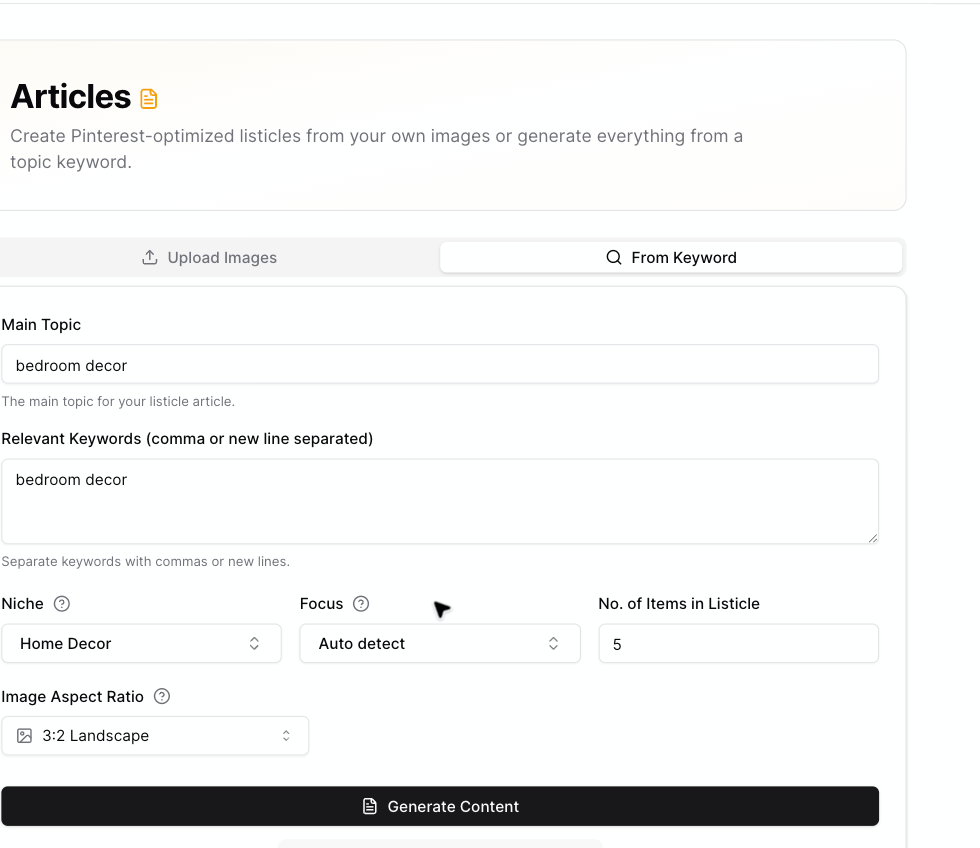
Use **No. of Items in Listicle** to choose how many sections Pinsearch should create.
You can choose **1 to 25** items.
Shorter articles are useful when:
* You are testing a topic.
* You want a quick draft.
* You have a narrow idea.
* You want to spend fewer credits.
Longer listicles are useful when:
* The topic has many clear examples.
* You want a bigger article.
* You are creating a roundup.
* You are building a larger content asset for WordPress.
## Credit impact
Topic-to-article generation uses **2 credits per item**.
Examples:
* 3 items use 6 credits.
* 5 items use 10 credits.
* 10 items use 20 credits.
* 25 items use 50 credits.
## Choose image aspect ratio
Use **Image Aspect Ratio** to choose the shape for AI-generated listicle images.
## Choose article length
Use **No. of Items in Listicle** to choose how many sections Pinsearch should create.
You can choose **1 to 25** items.
Shorter articles are useful when:
* You are testing a topic.
* You want a quick draft.
* You have a narrow idea.
* You want to spend fewer credits.
Longer listicles are useful when:
* The topic has many clear examples.
* You want a bigger article.
* You are creating a roundup.
* You are building a larger content asset for WordPress.
## Credit impact
Topic-to-article generation uses **2 credits per item**.
Examples:
* 3 items use 6 credits.
* 5 items use 10 credits.
* 10 items use 20 credits.
* 25 items use 50 credits.
## Choose image aspect ratio
Use **Image Aspect Ratio** to choose the shape for AI-generated listicle images.
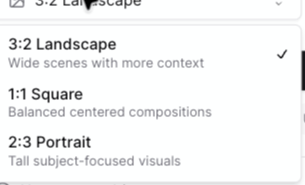 Available choices:
* **3:2 Landscape:** Wide scenes with more context.
* **1:1 Square:** Balanced centered compositions.
* **2:3 Portrait:** Tall subject-focused visuals.
## Which ratio should you use?
Use **3:2 Landscape** when the image needs room for a full scene, such as rooms, tables, landscapes, or product groupings.
Use **1:1 Square** when you want balanced images that crop cleanly in many layouts.
Use **2:3 Portrait** when you want taller visuals that feel closer to Pinterest pin shapes.
## Related guides
* [Create articles from a topic or keyword](/pinsearch-product-guides/ai-creation-tools/create-articles-from-topic-or-keyword)
* [How credits are used by AI creation tools](/pinsearch-product-guides/ai-creation-tools/credits-used-by-ai-creation-tools)
* [Prepare an article for publishing](/pinsearch-product-guides/article-editor-and-publishing/prepare-an-article-for-publishing)
Available choices:
* **3:2 Landscape:** Wide scenes with more context.
* **1:1 Square:** Balanced centered compositions.
* **2:3 Portrait:** Tall subject-focused visuals.
## Which ratio should you use?
Use **3:2 Landscape** when the image needs room for a full scene, such as rooms, tables, landscapes, or product groupings.
Use **1:1 Square** when you want balanced images that crop cleanly in many layouts.
Use **2:3 Portrait** when you want taller visuals that feel closer to Pinterest pin shapes.
## Related guides
* [Create articles from a topic or keyword](/pinsearch-product-guides/ai-creation-tools/create-articles-from-topic-or-keyword)
* [How credits are used by AI creation tools](/pinsearch-product-guides/ai-creation-tools/credits-used-by-ai-creation-tools)
* [Prepare an article for publishing](/pinsearch-product-guides/article-editor-and-publishing/prepare-an-article-for-publishing)